
Signage scalability explained: Streamline your communication
- True signage scalability involves centralized control, automation, and analytics, not just adding screens.
- Cloud-based platforms reduce manual updates, improve uptime, and enable efficient management across locations.
- Managing more than ten screens requires operational planning; ad-hoc systems become unsustainable at scale.
Most marketing and communications professionals assume that scaling digital signage is straightforward. Add more screens, push out content, done. But that assumption is where most programs start to break down. Beyond a handful of displays, the real challenge is not hardware. It is managing updates, monitoring uptime, and keeping content relevant across dozens or hundreds of locations simultaneously. ROI stems from reduced manual labor, higher uptime, and measurable lifts in engagement. This article breaks down what signage scalability actually means, how it works in practice, and how you can apply it to your communication strategy.
Table of Contents
- Understanding signage scalability: What it really means
- How scalable signage solutions work
- Comparing scalable versus ad-hoc signage deployments
- Applying signage scalability in real-world communication strategies
- Why most organizations underestimate signage scalability
- Take your signage to the next level with DST Connect
- Frequently asked questions
Key Takeaways
| Point | Details |
|---|---|
| True scalability is centralized | Managing multiple signage screens efficiently requires centralized platforms, not manual control. |
| ROI favors scalable platforms | Labor reduction and monitoring boost ROI significantly once you deploy more than 10 screens. |
| Automation drives engagement | Automated updates, monitoring, and analytics increase audience impact and reduce downtime. |
| Industry use cases | Hospitality, retail, and healthcare leverage scalability to improve internal and external communication. |
| Avoid common scaling mistakes | Don’t underestimate the operational complexity of managing dynamic signage as you grow. |
Understanding signage scalability: What it really means
Scalability in digital signage is one of those terms that gets used often but rarely gets defined clearly. Many teams interpret it as simply being able to add more screens to their network. That is only part of the picture.
True signage scalability means your system can grow in screen count, geographic reach, and content complexity without a proportional increase in manual effort or operational risk. It requires three foundational capabilities working together:
- Centralized control: One dashboard to manage all screens, regardless of location or hardware type.
- Automation: Scheduled content, real-time data feeds, and rule-based triggers that reduce the need for manual updates.
- Analytics: Measurable data on uptime, content performance, and audience engagement to guide decisions.
Without these three pillars, adding screens creates bottlenecks. Your team ends up spending more time managing logistics than creating impactful content.
A common misconception is that a content management system (CMS) alone equals scalability. A CMS helps you organize content, but it does not automatically solve the operational complexity of managing distributed displays. Scalability is an infrastructure problem as much as it is a software one.
“The real cost of unscalable signage is not the hardware. It is the hours your team loses to manual updates, troubleshooting, and inconsistent content delivery.”
This is where ROI of digital signage becomes tangible. Reduced manual labor, such as eliminating USB-based content updates, directly lowers operational costs. Reliable monitoring means faster response to screen failures, which keeps uptime high. And when you can measure engagement lifts tied to specific content, you can justify investment and optimize continuously.
Scalability is not a feature you add later. It is a design principle you build around from the start. If your current setup cannot handle ten screens without doubling your workload, it will not handle fifty without breaking your team.
How scalable signage solutions work
With the definition clarified, let us examine how modern scalable signage solutions are deployed and managed in practice.
Scalable platforms are built on cloud infrastructure. This means your content, scheduling rules, and device settings live in a central system accessible from anywhere. Here is how the operational flow typically works:
- Content creation and approval: Teams create or upload content through a browser-based editor, often with pre-built templates to speed up production.
- Scheduling and targeting: Content is assigned to specific screens, groups, or locations based on time, audience, or trigger conditions.
- Automated deployment: The platform pushes content to devices on schedule, without anyone manually transferring files or touching individual screens.
- Remote monitoring: The system tracks each screen’s status in real time, alerting administrators to connectivity issues, hardware faults, or content errors.
- Performance reporting: Analytics capture playback data, uptime percentages, and engagement metrics to inform future content decisions.
This workflow eliminates the most labor-intensive steps in traditional signage management. No USB drives. No on-site visits for routine updates. No guessing whether content actually played.
Pro Tip: Before selecting a platform, map out your current content update process step by step. Identify every manual touchpoint. A good scalable solution should eliminate at least 70% of those steps through signage automation benefits.
Remote troubleshooting is another major operational advantage. When a screen goes offline in a retail location three states away, your team can diagnose and often resolve the issue without dispatching a technician. This capability alone significantly reduces total cost of ownership (TCO).
It is worth noting that TCO favors platforms over ad-hoc approaches at ten or more screens. The investment in a proper platform pays back quickly when you factor in labor savings, reduced downtime, and the ability to scale without hiring additional staff. For teams focused on AV optimization for signage, cloud-based management also ensures display settings stay consistent across all hardware types.
Comparing scalable versus ad-hoc signage deployments
To drive home the real-world impact, let us compare scalable and ad-hoc deployments using a practical framework.
Ad-hoc signage setups are common in organizations that started small. One screen in a lobby, another in a break room, a third at a retail counter. Each one managed individually, often with USB drives or manual logins. It works at two or three screens. It starts to fail at ten.

| Factor | Ad-hoc deployment | Scalable platform |
|---|---|---|
| Content updates | Manual, screen by screen | Automated, centralized |
| Labor per screen added | Increases linearly | Stays flat or decreases |
| Uptime monitoring | Reactive (noticed when broken) | Proactive (alerts before impact) |
| Analytics | None or limited | Real-time performance data |
| Expandability | Difficult and costly | Designed for growth |
| Engagement potential | Static, infrequent updates | Dynamic, timely, targeted |
The gap between these two approaches widens as screen count grows. At five screens, the difference is manageable. At twenty-five screens, the ad-hoc model creates serious operational strain.
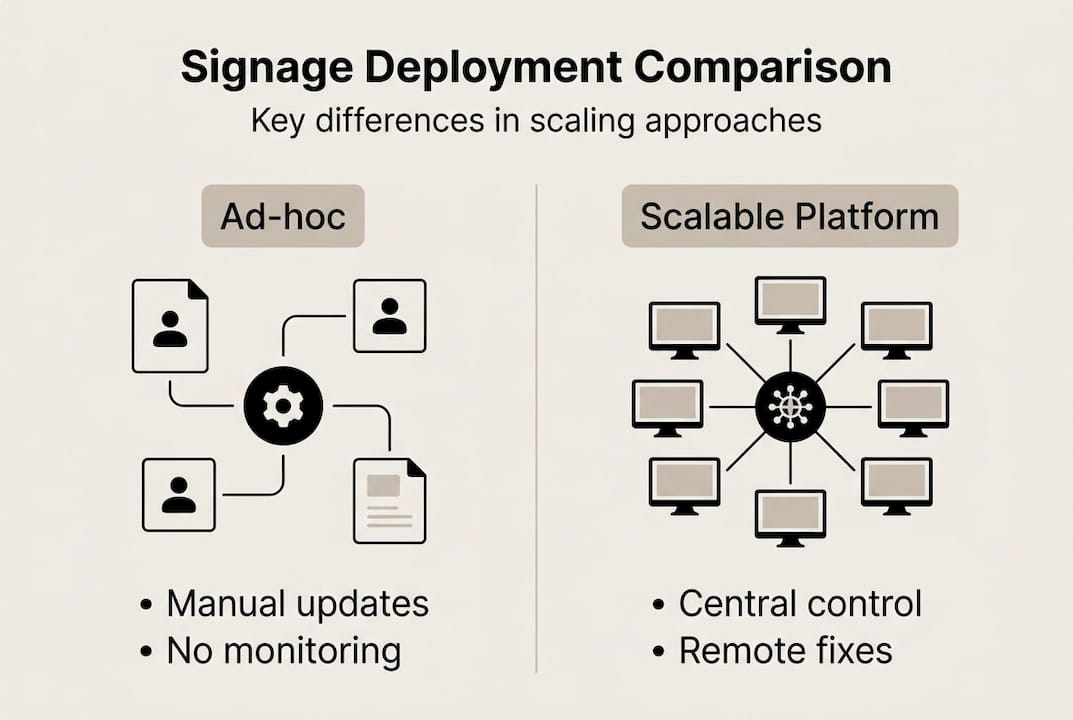
Key insight: TCO favors platforms over ad-hoc at ten or more screens. This is the inflection point where manual processes become genuinely unsustainable.
For teams managing signage workflow for engagement across multiple locations, the ad-hoc model also creates content inconsistency. Different screens show outdated or mismatched content, which undermines brand credibility and reduces audience trust.
Scalable platforms solve this by giving you version control over content. Every screen shows exactly what you approved, when you approved it. Combined with strong signage content creation tips, a scalable system lets your team produce more relevant content in less time, with consistent delivery across every location.
The bottom line is straightforward. If you are managing more than ten screens, or planning to, an ad-hoc approach is not a cost-saving strategy. It is a liability.
Applying signage scalability in real-world communication strategies
Next, let us see how scalability is put into practice across different industries, making communication more dynamic and responsive.
Scalable signage is not a one-size-fits-all solution. Its value shows up differently depending on the industry and communication goals. Here are three sectors where it makes a measurable difference.
Hospitality: Hotels and resorts use scalable signage to manage guest-facing displays across lobbies, restaurants, pool areas, and conference rooms. Content changes based on time of day, event schedules, or occupancy levels. Teams update menus, promotions, and wayfinding from a single dashboard, without visiting each screen. This directly supports enhancing guest experience at scale.
Retail: Multi-location retailers push product promotions, pricing updates, and seasonal campaigns to every store simultaneously. When a flash sale launches, every screen updates within minutes. No printed materials, no manual intervention, no lag between headquarters and the store floor.
Healthcare: Hospitals and clinics use scalable signage for both patient-facing and staff-facing communication. Waiting room displays reduce perceived wait times. Internal screens keep clinical teams updated on protocols, schedules, and safety information. Healthcare signage optimization at scale requires reliable uptime and precise scheduling, both of which scalable platforms deliver.
| Industry | Internal use case | External use case |
|---|---|---|
| Hospitality | Staff scheduling, event briefings | Guest wayfinding, promotions |
| Retail | Inventory alerts, staff comms | Product promotions, pricing |
| Healthcare | Protocol updates, shift info | Patient education, wait times |
Key benefits across all three sectors:
- Faster content updates tied to real-time events or data
- Consistent messaging across all locations
- Reduced reliance on printed materials
- Higher audience engagement through relevant, timely content
Measurable lifts in sales and engagement from scalable signage are well documented across these industries. The common thread is relevance. When content is timely and targeted, audiences respond.
Why most organizations underestimate signage scalability
After seeing real-world applications, here is our candid perspective on why scaling digital signage is often misunderstood and mismanaged.
Most teams focus on hardware when planning a signage expansion. They compare screen sizes, resolution specs, and mounting options. Those decisions matter, but they are not where scaling breaks down. The real bottlenecks are process-based. Who updates the content? How fast can changes go live? What happens when a screen fails at 9 PM on a Friday?
Organizations that skip the operational planning phase end up overwhelmed. They add screens faster than their workflows can support, and the result is stale content, inconsistent messaging, and frustrated staff.
The infrastructure and operational pitfalls are common and predictable. Yet most teams walk into them anyway because the hardware conversation is easier than the process conversation.
Our advice is simple: evaluate your scalability needs before you expand your screen count. Map your workflows. Identify your monitoring gaps. Then choose a platform that solves those problems, not just one that looks good in a demo. Understanding the demand for digital signage in your sector will also help you set realistic expectations for what scalability needs to deliver.
Take your signage to the next level with DST Connect
Finally, for professionals looking to put these strategies into practice, DST Connect offers a purpose-built solution for scalable signage management. The platform gives marketing and communications teams centralized control over unlimited screens, automated scheduling, and real-time monitoring, all without requiring technical expertise.
With over 700 professionally designed templates and a drag-and-drop editor, your team can produce and deploy content fast. DST Connect is compatible with Android, Windows, and URL-based media players, making it flexible for any existing hardware setup.
Start with a digital signage software free trial to see how the platform handles your specific use case. Need help with setup? Detailed IT signage instructions are available to streamline your implementation from day one.
Frequently asked questions
What does signage scalability mean for digital communication?
Signage scalability means managing many screens efficiently through centralized control and automation, reducing manual labor while maintaining consistent, relevant content across all locations.
What are the main benefits of scalable signage?
The main benefits include higher uptime, lower total cost of ownership, and measurable engagement lifts, especially as your screen network grows beyond ten displays.
How can organizations transition from manual to scalable signage?
Start by adopting a cloud-based signage platform, then automate your content scheduling and enable remote monitoring to reduce on-site management requirements.
What industries benefit most from scalable signage?
Hospitality, retail, and healthcare see the greatest gains, using scalable systems to streamline both internal staff communication and guest-facing messaging across multiple locations.
What is the ROI of scalable signage compared to ad-hoc solutions?
ROI accelerates with screen count because labor and engagement gains compound quickly, while ad-hoc management costs keep rising with every screen added.
Recommended
Enjoyed this blog?
Continue with the previous or next article and discover more ideas, insights and inspiration from DST Connect.