
Step-by-step guide to efficient screen scheduling
TL;DR:
- Effective screen scheduling aligns content timing with audience behavior to boost sales and engagement.
- Proper infrastructure and planning are essential to maximize digital signage ROI and operational efficiency.
- Continuous monitoring and team collaboration improve schedule accuracy and drive ongoing digital signage success.
Digital signage is one of the most underutilized assets in modern business communication. A 15-32% lift in retail sales is well within reach for organizations that schedule their screens strategically, yet most teams still rely on static playlists that run the same content all day. Disorganized screen scheduling wastes your display inventory, dilutes your message, and leaves real revenue on the table. This guide walks you through everything you need to set up, execute, and measure a screen scheduling strategy that drives results across retail, hospitality, corporate, and beyond.
Table of Contents
- Why screen scheduling matters for modern organizations
- Gathering your tools and requirements
- Step-by-step: Scheduling your content for maximum efficiency
- Troubleshooting and best practices for screen scheduling
- Verifying success: How to measure and improve your scheduling impact
- What most guides miss about screen scheduling
- Bring your scheduling strategy to life with DST Connect
- Frequently asked questions
Key Takeaways
| Point | Details |
|---|---|
| Major ROI potential | Strategic screen scheduling can drive 15-32% sales lift and significant cost savings. |
| Right tools matter | Use dedicated scheduling software and compatible hardware for efficiency and scale. |
| Follow clear steps | A step-by-step approach ensures consistency, engagement, and fewer mistakes. |
| Continuous improvement | Regular analytics and feedback drive ongoing communication and revenue gains. |
| Collaboration counts | Engaging multiple departments increases buy-in and content effectiveness. |
Why screen scheduling matters for modern organizations
Screen scheduling is not just a technical task. It is a strategic communication decision that affects sales, employee engagement, and brand perception at every location where you operate a display.
The financial evidence is hard to ignore. Retailers see 400% ROI in their first year with digital signage, and 68% of businesses report over 20% revenue growth when they use it strategically. On top of that, organizations reduce print-related costs by up to 80% once they move scheduled content to digital displays.
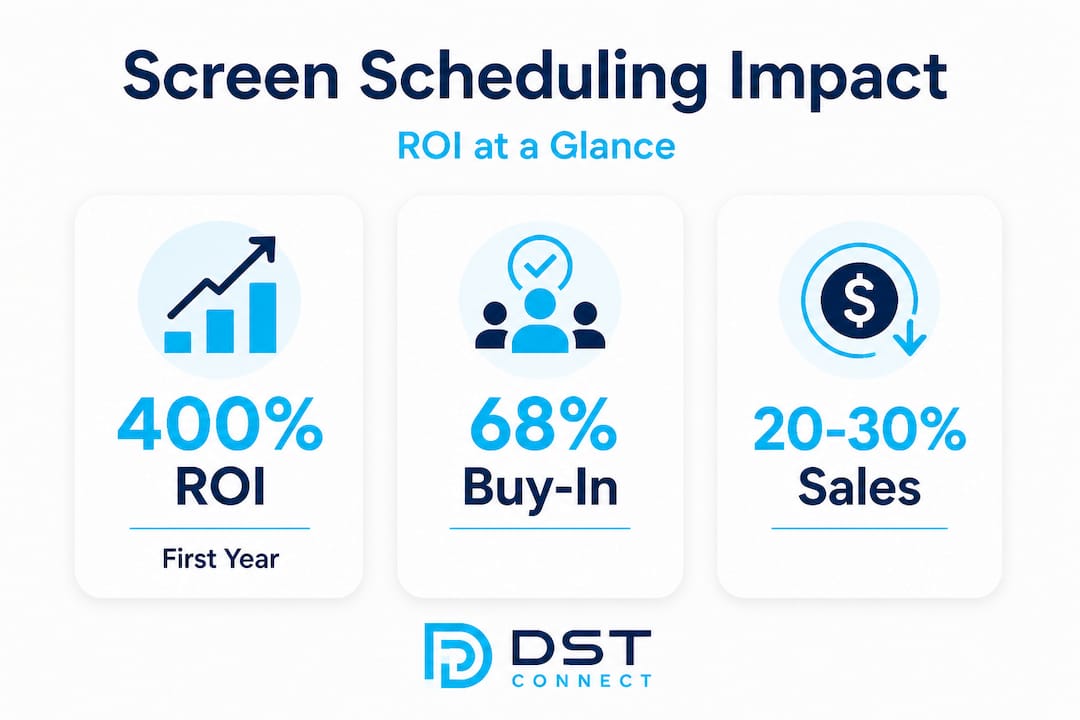
Those numbers reflect something important: the scheduling piece is what separates high-performing digital signage from glorified TV screens. When the right message appears at the right time in the right location, it performs. When it doesn’t, it becomes background noise.
Here is what well-structured screen scheduling delivers for your organization:
- Higher sales conversion by aligning promotional content with peak traffic hours
- Better internal communication by pushing relevant updates to staff at the start of shifts
- Reduced operational costs by eliminating the need for printed materials and manual sign changes
- Stronger brand consistency across multiple locations managed from a central dashboard
- Improved guest experience when displays provide timely, contextual information instead of irrelevant loops
Organizations in hospitality have seen strong results specifically because scheduled content can be tied to guest flow patterns. Enhancing guest experience through timed content means breakfast specials appear in the morning and dinner promotions run in the evening automatically.
If you want to move beyond basic playlists and engage audiences with signage at a deeper level, scheduling is the mechanism that makes it possible. With the value established, it’s time to gather your essentials for effective screen scheduling.
Gathering your tools and requirements
Before you build a single schedule, you need the right infrastructure. Jumping into scheduling software without assessing your hardware and content readiness leads to technical delays and poor playback quality.

Here is a clear overview of what you will need:
| Requirement | Purpose | Must-have features |
|---|---|---|
| Display screens | Show content to your audience | Commercial-grade panels, adequate brightness (500+ nits), correct orientation |
| Media players | Run the scheduling software and push content to screens | Android or Windows OS, reliable connectivity, remote management |
| Digital signage CMS | Plan, schedule, and deploy content | Drag-and-drop editor, real-time updates, multi-screen support |
| Content library | Provide ready-to-deploy visuals | Branded templates, video support, dynamic data feeds |
| Staff roles | Manage and update schedules | Content manager, approver, and screen administrator |
| Network connection | Sync cloud-based schedules | Stable Wi-Fi or Ethernet with sufficient bandwidth |
The most common mistake at this stage is choosing hardware and software separately without confirming compatibility. A good digital signage software guide can help you match players, displays, and CMS platforms before you invest.
The key areas to evaluate before purchasing any component are:
- Scalability: Can the software manage 5 screens today and 50 screens in 12 months?
- Ease of use: Can a non-technical team member update content without developer help?
- Integration: Does the platform support live data feeds, social media pulls, or weather-based triggers?
- Security: Does the software include user role management and encrypted connections?
Digital signage delivers substantial ROI when the right tools are in place from day one. Cutting corners on hardware or choosing a CMS that lacks scheduling depth will cost more to fix later than doing it right the first time.
Pro Tip: Choose a CMS that supports content dayparting natively. Dayparting means automatically showing different content segments during defined time windows, such as morning, afternoon, and evening. This single feature eliminates manual content swaps and dramatically reduces the workload for your team. Review display optimization tips to make sure your hardware is calibrated to match your content quality.
Now that you know what you need, let’s walk through the core steps of screen scheduling.
Step-by-step: Scheduling your content for maximum efficiency
A structured approach to screen scheduling eliminates guesswork and ensures every minute of airtime is working toward a business goal. Follow this sequence to build schedules that perform consistently.
- Map your content to audience moments. Start by listing every message you want to communicate across each display location. Assign each message to a time window when your target audience is most likely to see and respond to it. A promotion for a lunch combo should not run at 8 AM.
- Segment content into dayparts. Divide your operating hours into logical blocks, for example morning (6 AM to 11 AM), midday (11 AM to 2 PM), afternoon (2 PM to 5 PM), and evening (5 PM to close). Each daypart should have its own playlist optimized for the audience present at that time.
- Set recurring schedules for evergreen content. Identify content that stays relevant week to week, such as brand messaging, safety announcements, and employee recognition slides. Schedule these as recurring items so they fill gaps without manual rescheduling.
- Layer in time-sensitive promotions. Add campaign-specific content with clear start and end dates. This prevents outdated promotions from running after a sale ends, which is one of the most damaging credibility mistakes an organization can make.
- Preview and test every schedule before deploying. Use your CMS preview function to confirm that transitions, durations, and sequencing look correct. Test on at least one live screen before pushing to all locations.
- Deploy and monitor in real time. Push the approved schedule to your target screens via your cloud-based dashboard. Confirm that all players are online and receiving the correct content. Set alerts for offline screens or playback errors.
Quick service restaurants see 20-30% sales increases when they optimize their scheduling around peak ordering windows. The same principle applies to retail, healthcare waiting areas, and corporate lobbies: timing your content to match audience behavior is the single biggest lever you can pull.
The table below shows why automation outperforms manual scheduling for teams managing more than a handful of screens:
| Factor | Manual scheduling | Automated scheduling |
|---|---|---|
| Update speed | Hours to days | Real-time or scheduled |
| Error risk | High (human oversight) | Low (rule-based logic) |
| Scalability | Limited to staff capacity | Unlimited screen groups |
| Content freshness | Dependent on manual review | Dynamic feeds keep it current |
| Cost over time | High (labor intensive) | Low (set-and-monitor model) |
For teams ready to go deeper, reviewing signage automation strategies provides a practical framework for automating triggers based on real-time data, weather, inventory, or audience demographics.
Pro Tip: Use the manager’s scheduling guide to establish a consistent weekly review rhythm. Pair it with strong content creation tips to keep your visual assets fresh and aligned with each campaign cycle. You can also explore broader business optimization strategies to connect your signage goals with wider operational performance targets.
Following best practices can help you avoid common scheduling mistakes and maximize ROI.
Troubleshooting and best practices for screen scheduling
Even well-designed schedules run into problems. Knowing what to watch for saves hours of troubleshooting and protects your audience experience.
Common scheduling errors include:
- Overlapping content windows that cause playback conflicts or blank screens during the gap
- Outdated promotions running because end dates were not set during upload
- Mismatched aspect ratios resulting in stretched or letterboxed visuals that look unprofessional
- Screens running offline without alerts, meaning content has not updated for hours or days
- Over-scheduled playlists where too many items cycle so quickly that no single message lands
- Missing approvals when multi-user workflows require sign-off before content goes live
Each of these problems has a quick fix once you identify it. Overlapping windows need a content audit and timeline review. Outdated content requires mandatory end-date fields in your upload workflow. Aspect ratio issues are solved by enforcing resolution templates at the content creation stage.
The most critical troubleshooting mindset shift is this: treat your schedule as a living document, not a one-time setup. Organizations that review and adjust schedules weekly outperform those that set and forget by a wide margin.
Print-related costs drop by over 80% when organizations maintain well-managed digital signage, but that savings only holds when content stays current and accurate. Outdated digital signage is just as damaging as a faded paper poster, and it undermines the credibility of your digital signage announcements.
Best practices for continuous improvement include scheduling a monthly full-content audit, assigning ownership of each screen zone to a specific team member, and using A/B testing to compare engagement across different content formats. Restaurants specifically benefit from testing upsell strategies through timed menu board promotions to identify which combinations drive the highest add-on sales.
Once you’re monitoring and improving, it’s vital to measure your scheduling ROI and impact on communications.
Verifying success: How to measure and improve your scheduling impact
Measuring the impact of your screen scheduling strategy turns intuition into evidence and gives you the data to justify further investment or expansion.
Businesses report over 20% growth when digital signage is used strategically, but that growth is only traceable when you define and track the right metrics from the start.
The table below outlines the key performance indicators to monitor before and after implementing structured scheduling:
| KPI | Pre-scheduling baseline | Post-scheduling target | How to measure |
|---|---|---|---|
| Sales lift per location | Current average transaction value | 15-30% increase | POS data comparison |
| Content change time | Hours per update | Minutes per update | CMS activity logs |
| Print cost reduction | Monthly spend on printed materials | 70-80% reduction | Finance records |
| Screen uptime | % of time screens are active and correct | 98%+ | CMS monitoring dashboard |
| Audience dwell time | Average seconds spent at display | Increase vs. baseline | Camera analytics or staff observation |
| Staff communication recall | Informal survey baseline | Measurable improvement | Pulse surveys pre and post launch |
Use these steps to refine your schedules based on what the data tells you:
- Pull weekly performance reports from your CMS and cross-reference with sales data from the same period.
- Identify low-performing time slots where content is running but no measurable engagement or conversion is occurring.
- Test alternative content formats in underperforming slots, such as video versus static graphics, or interactive prompts versus passive display.
- Adjust daypart boundaries based on real traffic patterns rather than assumptions. If your lunch crowd peaks at 12:30 PM instead of noon, shift your midday daypart accordingly.
- Report findings to stakeholders on a monthly basis to maintain organizational buy-in and secure budget for ongoing improvements.
Understanding the growing demand for digital signage helps frame these results in a broader market context. When leadership sees that competitor organizations are accelerating their signage strategies, internal investment decisions become easier to justify.
What most guides miss about screen scheduling
Most screen scheduling guides focus on the technical workflow. Set this time, upload that file, push to these screens. That’s necessary, but it misses the bigger challenge that actually determines whether a scheduling strategy succeeds or fails.
The real obstacle is internal alignment. Content managers, marketing teams, operations staff, and department heads all have competing priorities. Without a clear approval workflow and a shared editorial calendar, schedules get cluttered with last-minute additions, conflicting messages, and content that was designed by committee and resonates with no one.
Iterative, audience-driven scheduling consistently outperforms static quarterly planning. Organizations that review their content performance every two weeks and make small, data-informed adjustments build momentum over time. Those that plan once per quarter and stick rigidly to the plan miss opportunities and grow frustrated when results are flat.
The second thing most guides miss is that content flexibility is a competitive advantage. If your CMS locks you into rigid templates or makes it difficult to respond quickly to a market event, a weather change, or an internal announcement, you lose the core benefit of digital signage over print. The ability to update content in minutes, not days, is the value proposition. Your scheduling strategy should be designed to protect that speed.
Pro Tip: Build a cross-departmental feedback loop into your scheduling workflow. Ask frontline staff what content they find irrelevant or repetitive, collect input from customers where possible, and use that feedback to sharpen your next planning cycle. Strong creative signage tactics only land when they are informed by the people closest to the audience.
Cultural buy-in grows when teams see that their input shapes what appears on screen. That sense of ownership turns passive users into active advocates for your digital signage program.
Bring your scheduling strategy to life with DST Connect
DST Connect makes it straightforward to put everything in this guide into practice. The platform gives marketing and communications managers access to over 700 professionally designed templates, a drag-and-drop editor for rapid content updates, and a cloud-based dashboard for managing screens across multiple locations worldwide. Automation features like real-time data feeds, dayparting, and multi-user approval workflows mean your scheduling strategy runs efficiently without requiring technical expertise. Explore DST Academy training to sharpen your team’s skills, and browse the full range of compatible digital signage hardware to find the right setup for your organization’s size and goals. The ROI is clear. The tools are ready. Let DST Connect help you put them to work.
Frequently asked questions
What is screen scheduling in digital signage?
Screen scheduling means planning and automating what content appears on your digital displays and when, streamlining communication for maximum impact across every location you operate.
How does efficient screen scheduling impact revenue?
Efficient scheduling can drive 15-32% higher retail sales and over 20% revenue growth for many businesses by aligning promotional content with peak audience moments.
What tools are essential for digital screen scheduling?
You need commercial display hardware, a scheduling-enabled CMS, compatible media players, and a ready content library tailored to your audience and locations.
What are common mistakes in screen scheduling?
Common pitfalls include overlapping content windows, outdated promotional messages running past their end dates, and neglecting analytics that would otherwise guide continuous improvement.
How can I measure the success of my screen scheduling strategy?
Monitor sales growth and cost savings compared to your pre-scheduling baseline, track screen uptime through your CMS dashboard, and run regular staff and audience surveys to assess message recall.
Recommended
- Master digital display scheduling: a practical guide
- Multi-screen management: a complete guide for digital signage
- How to manage retail screens for engaging digital signage
- Boost student engagement: effective digital screen strategies
- Synchroniser vos calendriers Airbnb : guide étape par étape | PerfectHost
Enjoyed this blog?
Continue with the previous or next article and discover more ideas, insights and inspiration from DST Connect.