
Why use digital signage for announcements in 2026
Marketing professionals waste thousands on print announcements that employees ignore or discard within hours. Meanwhile, growing demand for digital signage shows organizations shifting to screens that capture attention instantly and update content remotely. Digital displays transform how you communicate internally with staff and externally with customers, delivering messages that actually get seen. This guide reveals why digital signage outperforms traditional methods for announcements, how to choose cost-effective solutions, and practical steps to implement screens that elevate your communication strategy without draining budgets.
Table of Contents
- The Shortcomings Of Traditional Announcement Methods
- How Digital Signage Enhances Announcement Effectiveness
- Comparing Digital Signage Solutions For Announcements: Features And Costs
- Implementing Digital Signage In Your Marketing And Communication Strategy
- Enhance Your Announcements With DST Connect Digital Signage
- FAQ
Key takeaways
| Point | Details |
|---|---|
| Engagement boost | Digital signage captures attention better than print or email, increasing message visibility and audience interaction |
| Cost savings | Eliminates recurring printing and distribution expenses while reducing labor time for content updates |
| Real-time agility | Instant remote updates enable timely announcements and responsive communication strategies |
| Flexible targeting | Schedule and customize content by location, time, or audience segment for maximum relevance |
The shortcomings of traditional announcement methods
Print announcements drain budgets through endless cycles of design, printing, and physical distribution. Every policy update or event promotion requires new materials, creating waste and delays that frustrate marketing teams trying to communicate quickly. Costs compound when you need multiple versions for different locations or audiences.
Email newsletters face even worse challenges in 2026. Busy professionals receive hundreds of messages daily, causing important announcements to vanish in cluttered inboxes. Open rates for internal communications hover around 20 to 30 percent, meaning most employees never see critical updates. External email campaigns struggle similarly, competing with spam filters and inbox fatigue that reduce message impact.
Static bulletin boards and posters cannot adapt to changing circumstances. Once printed and posted, these announcements remain fixed until someone manually replaces them. This inflexibility creates communication gaps when urgent updates arise or information becomes outdated. Physical materials also deteriorate, looking unprofessional after weeks of exposure to light and handling.
Traditional announcements have lower engagement rates and limited immediacy compared to digital methods. Audiences increasingly expect dynamic, visually appealing content that respects their time and attention. Print and static displays fail to deliver the immediacy modern communication demands, leaving organizations struggling to connect with stakeholders effectively.
Consider these limitations of conventional announcement channels:
- Print materials require lead time for design and production, delaying time-sensitive messages
- Physical distribution depends on manual effort, creating inconsistent delivery across locations
- Static content cannot respond to real-time events or audience feedback
- Traditional methods offer no analytics to measure engagement or effectiveness
Pro Tip: Calculate your annual spending on printed announcements, including design, materials, and staff time for distribution. This baseline reveals potential savings when switching to digital signage.
How digital signage enhances announcement effectiveness
Bright screens positioned strategically in high-traffic areas command attention that paper announcements never achieve. Digital displays use motion, color, and contrast to draw eyes naturally, making messages impossible to miss. Unlike static posters that blend into backgrounds, screens create visual focal points that interrupt routine patterns and capture awareness.
Content management systems enable instant updates from anywhere with internet access. Marketing teams can schedule announcements weeks in advance or push emergency messages within seconds when situations demand immediate communication. This flexibility transforms how organizations respond to events, ensuring stakeholders receive timely information without printing delays or physical distribution bottlenecks.
Digital signage supports diverse announcement types across internal and external audiences. Employee-facing screens display policy updates, safety reminders, performance metrics, and event calendars. Customer-facing displays showcase promotions, product launches, wayfinding information, and brand messaging. The same hardware serves multiple communication purposes, maximizing return on investment.
Dynamic, targeted content updated in real-time boosts engagement significantly compared to static alternatives. Screens can rotate multiple messages, preventing viewer fatigue while covering more topics than single posters allow. Scheduling features ensure relevant content appears at optimal times, like displaying lunch specials during midday hours or safety protocols during shift changes.
Location-based targeting delivers precise messaging to specific audiences. Corporate offices might show different announcements on executive floor screens versus factory floor displays. Retail chains can customize content by store location, highlighting region-specific promotions or local community involvement. This granular control ensures messages resonate with intended recipients rather than broadcasting generic information.
Key advantages of digital announcement displays include:
- Superior visibility through bright screens and motion graphics that attract attention
- Instant content updates eliminating production and distribution delays
- Scheduling capabilities for automated, timely message delivery
- Multi-format support for videos, images, text, and live data feeds
- Analytics tracking viewer engagement and content performance
Pro Tip: Start with high-traffic areas where announcements reach maximum audiences, like building entrances, break rooms, or reception areas. Measure engagement before expanding to additional locations.
Explore digital signage optimization tips to maximize announcement impact through strategic placement and content design. Professional digital display templates accelerate content creation while maintaining visual consistency across your communication channels.
Comparing digital signage solutions for announcements: features and costs
Hardware choices significantly impact both capabilities and budgets when implementing digital announcement systems. LED screens offer exceptional brightness for outdoor or high-ambient-light environments but carry higher upfront costs. LCD displays provide excellent indoor performance at lower price points, making them ideal for office lobbies, break rooms, and meeting spaces. Interactive kiosks enable two-way communication, letting viewers access detailed information beyond basic announcements, though they require more complex content planning.
Software platforms determine how easily you create, schedule, and manage announcement content. Cloud-based content management systems let multiple team members update displays remotely without technical expertise. Drag-and-drop editors simplify design work, while template libraries provide professional starting points that maintain brand consistency. Scheduling tools automate content rotation, ensuring announcements appear at optimal times without manual intervention.

Different digital signage solutions vary in hardware, software features, and implementation costs based on organizational needs. Entry-level systems using repurposed tablets or small displays cost a few hundred dollars per screen, suitable for single-location businesses testing digital announcements. Enterprise solutions with professional displays, advanced software, and multi-location management range from thousands to tens of thousands depending on scale and features.
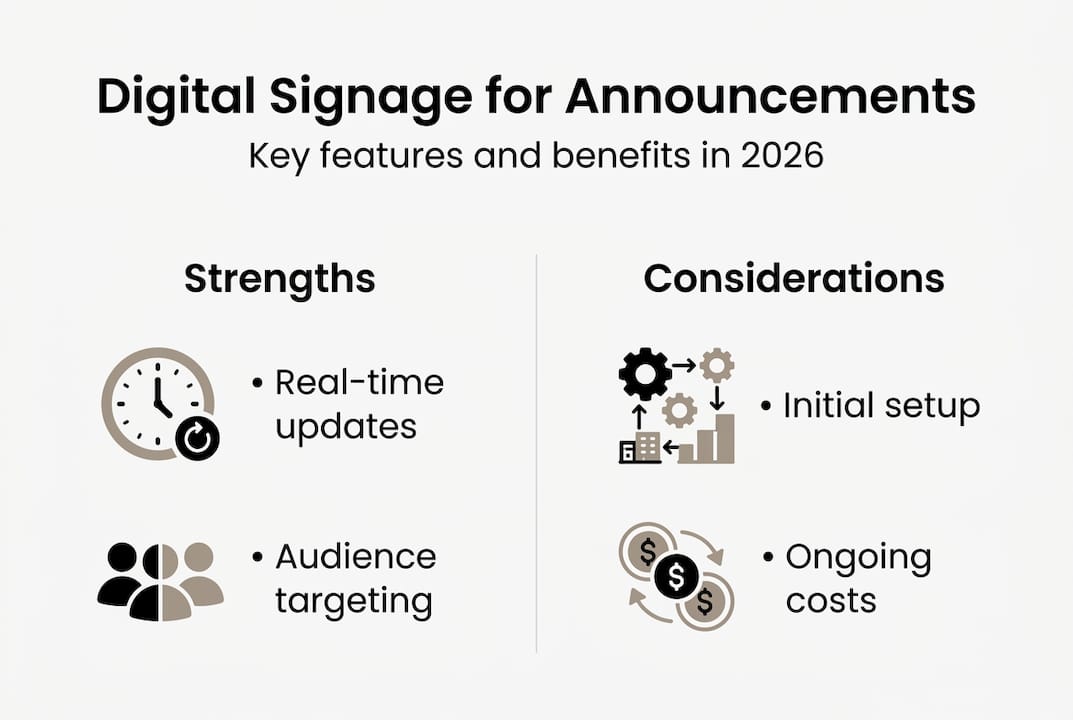
Cost considerations extend beyond initial purchase prices. Subscription-based software typically charges monthly or annually per screen, with pricing tiers based on features like user accounts, storage capacity, and support levels. On-premise systems require upfront software licenses but avoid recurring fees, though they demand internal IT resources for maintenance and updates. Factor in electricity costs, internet connectivity, and occasional hardware repairs when calculating total ownership expenses.
| Solution Type | Best For | ||
|---|---|---|---|
| Cloud-based system | Multi-location organizations needing remote management | ||
| On-premise system | Single-location businesses with IT staff | ||
| Managed service | Organizations wanting turnkey solutions |
On-premise systems offer complete data control and eliminate dependency on internet connectivity for basic playback. However, they require dedicated servers, IT expertise for troubleshooting, and manual updates across locations. Cloud-based platforms provide automatic updates, remote access from any device, and simplified multi-location management, though they depend on reliable internet connections and involve ongoing subscription costs.
Pro Tip: Request detailed total cost of ownership projections covering three to five years, including hardware, software, installation, training, and support. This long-term view reveals true expenses beyond attractive initial pricing.
Evaluate digital signage hardware options based on your specific announcement needs, viewing environments, and budget constraints before committing to solutions.
Implementing digital signage in your marketing and communication strategy
Successful deployment starts with analyzing your current announcement challenges and audience behaviors. Map where stakeholders spend time, what information they need, and when they’re most receptive to messages. Identify communication gaps that digital signage can fill, like reaching employees who don’t check email regularly or capturing customer attention during wait times. This assessment guides hardware placement, content strategy, and success metrics.
Content creation requires balancing information density with visual appeal. Announcements should communicate key points within 5 to 10 seconds since viewers often pass displays quickly. Use large fonts, high-contrast colors, and minimal text supplemented by images or icons. Video content increases engagement but demands more production resources, so start with static templates and add motion graphics as your team gains experience.
Scheduling maximizes announcement relevance by matching content to viewer context. Display employee recognition during shift starts, safety reminders before high-risk tasks, and event promotions weeks in advance with countdown timers. External announcements should align with customer journey stages, showing product benefits near decision points and promotions during peak shopping hours. Automation ensures consistent execution without daily manual updates.
Monitoring engagement reveals what resonates with audiences and what falls flat. Track which announcements generate questions, actions, or feedback from viewers. Some platforms offer analytics showing content performance, though simpler systems require observational assessment. Iterate based on results, testing different designs, messaging approaches, and display durations to optimize impact over time.
Effective deployment requires planning content strategy, placement, and staff training to ensure success across your organization.
Follow these implementation steps for smooth digital signage adoption:
- Audit current announcement methods to identify inefficiencies and improvement opportunities
- Define clear objectives for digital signage, like reducing email overload or increasing event attendance
- Select hardware and software matching your technical capabilities, budget, and scalability needs
- Install displays in high-visibility locations with appropriate power and connectivity
- Create content templates maintaining brand consistency while enabling quick updates
- Train staff on content creation, scheduling, and basic troubleshooting procedures
- Launch with simple announcements, gathering feedback before expanding content complexity
- Establish regular review cycles to assess performance and refine your approach
Staff training prevents implementation failures caused by technology intimidation or workflow confusion. Designate content champions in each department who understand both the platform and their team’s communication needs. Provide hands-on practice creating and scheduling announcements, emphasizing the simplicity of modern systems. Document common tasks with screenshots or quick-reference guides that reduce support requests.
Pro Tip: Start with a pilot program in one location or department, proving value and refining processes before organization-wide rollout. Early wins build momentum and secure stakeholder buy-in for expansion.
Learn about cross-platform signage guidance to ensure your announcement system works seamlessly across different devices and locations.
Enhance your announcements with DST Connect digital signage
Modern communication demands solutions that combine simplicity with powerful capabilities. DST Connect delivers exactly that through intuitive software supporting over 600 professionally designed templates that accelerate announcement creation without requiring design expertise. The drag-and-drop editor lets marketing teams customize content quickly, while cloud-based management enables updates across multiple screens from any location.
Flexible hardware solutions accommodate diverse organizational needs and budgets, from compact displays for small offices to large-format screens for public spaces. Compatibility with Android, Windows, and URL-based media players means you can leverage existing equipment or select new devices matching your specific requirements. The platform scales effortlessly as your announcement needs grow.
Experience the difference with a 14-day free trial of DST Connect software, exploring features without commitment. Comprehensive support and instructions available in multiple languages ensure smooth implementation regardless of your team’s technical background. Transform your announcements from overlooked messages into engaging communications that drive real results.
FAQ
Why is digital signage more cost-effective than print announcements?
Digital signage eliminates recurring expenses for printing, paper, and physical distribution that drain budgets with every announcement update. After initial hardware and software investment, content changes cost nothing beyond staff time for creation. Organizations typically recover implementation costs within 12 to 18 months through eliminated print expenses. Digital displays also reduce waste, supporting sustainability goals while cutting costs.
Can digital signage target specific audiences with announcements?
Advanced scheduling and location-based features enable precise audience targeting impossible with traditional methods. Content management platforms let you assign different announcements to specific screens, ensuring relevant messages reach intended viewers. Time-based scheduling displays content when target audiences are present, like showing employee benefits information during shift changes. This targeting increases message relevance and engagement significantly.
How quickly can announcements be updated on digital signage?
Cloud-based systems enable instant content updates remotely from any internet-connected device, taking seconds rather than the hours or days print requires. Emergency announcements can reach all screens simultaneously, ensuring critical information spreads immediately. Scheduled updates allow planning announcements weeks in advance, automating delivery without last-minute rushes. This speed and flexibility transform organizational responsiveness to events and opportunities.
Are there any challenges when adopting digital signage for announcements?
Initial implementation requires thoughtful planning around content strategy, hardware placement, and staff workflow integration to avoid underutilization. Teams accustomed to print may need time adjusting to digital content creation, though modern platforms minimize learning curves through intuitive interfaces. Technical issues like connectivity problems or hardware failures can disrupt announcements if backup plans aren’t established. Most providers offer comprehensive support, training resources, and troubleshooting assistance that smooth adoption and resolve challenges quickly.
Recommended
Enjoyed this blog?
Continue with the previous or next article and discover more ideas, insights and inspiration from DST Connect.