
Dynamic content in digital signage: boost engagement
TL;DR:
- Dynamic signage delivers 400% more views and boosts retail sales by up to 32 percent compared to static signs. It works through triggers like time, weather, and inventory, enabling real-time updates and personalized, engaging content. Most SMBs underestimate its value, but with proper management, dynamic content offers rapid ROI, lower costs, and improved customer experiences.
Static signs don’t compete anymore. Dynamic signage gets 400% more views compared to static displays, and organizations that make the switch report retail sales uplifts of 25 to 32 percent along with a recall rate that climbs as high as 83 percent. Yet many marketing and communications managers at small to medium-sized organizations (SMBs) still rely on printed posters or fixed-image screens, often because they assume dynamic content is too expensive, too technical, or too time-consuming to manage. This article breaks down exactly what dynamic content is, how it works, what results it produces, and how your organization can implement it responsibly and cost-effectively.
Table of Contents
- What is dynamic content in digital signage?
- How dynamic content works: triggers, tools, and integration
- Real-world results: empirical benchmarks for dynamic content
- Practical challenges, pitfalls, and design tips for dynamic signage
- Why most SMBs undervalue dynamic content—and how to get it right
- Take the next step with DST Connect’s digital signage solutions
- Frequently asked questions
Key Takeaways
| Point | Details |
|---|---|
| Engagement multiplier | Dynamic signage boosts viewer engagement and recall several times more than static displays. |
| Real-time relevance | Content updates automatically based on data, triggers, and external events, keeping messaging timely. |
| ROI and impact | Empirical evidence shows significant sales lifts, high recall rates, and rapid payback periods. |
| Challenges to address | Upfront investment and content design are crucial; responsible integration ensures sustained performance. |
| Best practice: hybrid | Combine dynamic updates with static basics for optimal communication and cost efficiency. |
What is dynamic content in digital signage?
With engagement as the headline, let’s clarify what dynamic content actually means and how it differs from traditional static signage.
Dynamic content in digital signage refers to displays that automatically update based on data inputs, triggers, or variables. Think of a screen in a retail store that shows today’s weather alongside a relevant product promotion, or a hospital waiting room display that adjusts queue information in real time. The content changes without a staff member manually uploading a new file.
Static signage, on the other hand, is fixed. It shows the same image, text, or graphic until someone physically replaces it. While static displays work well for permanent information like exit signs or brand guidelines, they simply cannot respond to changing conditions. That gap in responsiveness is where dynamic content wins.
Here’s a side-by-side comparison to make this concrete:
| Feature | Dynamic signage | Static signage |
|---|---|---|
| Content updates | Automatic, real-time | Manual replacement |
| Flexibility | High | Low |
| Engagement level | High (400% more views) | Low to moderate |
| Upfront cost | Moderate to high | Low |
| Ongoing update cost | Very low | Printing + labor |
| Best use case | Promotions, live data, menus | Permanent info, wayfinding |
| Personalization | Yes | No |
Key advantages of dynamic signage:
- Content stays relevant without manual effort
- Multiple screens can be updated simultaneously from one dashboard
- Promotions can be scheduled in advance and activated automatically
- Real-time data feeds (weather, stock levels, news) can drive display logic
- A/B testing is possible across different locations or screen zones
Key advantages of static signage:
- No power or internet dependency
- Very low production cost for permanent messaging
- Durable in outdoor or rugged environments
- No software maintenance required
The dynamic vs static signage debate rarely produces a clear winner. Most experts recommend a hybrid approach: use dynamic content for high-traffic promotional zones and static signage for fixed informational areas. If you want to see what this looks like in practice, check out these digital display content examples to get a feel for where each method adds the most value.
How dynamic content works: triggers, tools, and integration
Now that the concept is clear, let’s look at how dynamic content is actually deployed and managed in real-world settings.
The core mechanism behind dynamic signage is the trigger. A trigger is simply a condition or event that causes the display to update. Methodologies include event-triggered changes, data-triggered updates, and API/webhook-based triggers for external events such as weather changes, time of day, or inventory levels. Here’s a practical breakdown:
| Trigger type | Example | Typical solution |
|---|---|---|
| Time-based | Breakfast menu switches to lunch at 11am | Scheduling in CMS |
| Weather-based | Rain triggers umbrella promotion | Weather API integration |
| Inventory-based | Out-of-stock items removed from display | POS/inventory API |
| Event-based | Conference room display updates when booking changes | Calendar integration |
| Location-based | Personalized content for specific store zones | Sensor or beacon data |
| Audience-based | Promotion shifts when demographic data changes | Camera analytics |
Deploying dynamic content effectively involves a clear sequence of steps. Here’s how most organizations get started:
- Audit your current signage. Identify which displays show frequently changing information (menus, promotions, schedules) versus fixed content. Focus your dynamic investment on the high-turnover screens first.
- Choose a content management system (CMS). A CMS is the software platform that controls what appears on your screens. Look for one that supports API integrations, scheduling, and multi-screen management from a single dashboard.
- Map your triggers. Decide what conditions should drive content changes. Start simple: time of day, day of week, or a manual scheduled playlist.
- Design your content templates. Use pre-built templates that can be populated automatically with data fields. This avoids redesigning every time content changes.
- Test before you deploy. Run your content on a single screen for one to two weeks, track engagement, and refine before rolling out across multiple locations.
- Scale and automate. Once your baseline is working, layer in more sophisticated triggers like weather feeds or inventory APIs.
For organizations in food service, a dynamic menu board guide can help you set up time-based content rotations and pricing automation efficiently. For broader display performance, these AV signage optimization tips cover hardware and software settings that affect how your content looks in different lighting conditions.
It is also worth noting that managing guest communications through dynamic screens in hospitality settings is a strong example of triggers working at their best. Arrival times, room-specific promotions, and local event information can all display automatically without any staff involvement.
Pro Tip: Don’t start with the most complex triggers available. Pick one high-traffic screen, add a simple time-based rotation of your top three promotions, and measure sales lift over 30 days. That data gives you the business case to invest in more sophisticated automation.
Real-world results: empirical benchmarks for dynamic content
Once you understand the methods, it’s critical to see what results dynamic content can actually deliver in practice.
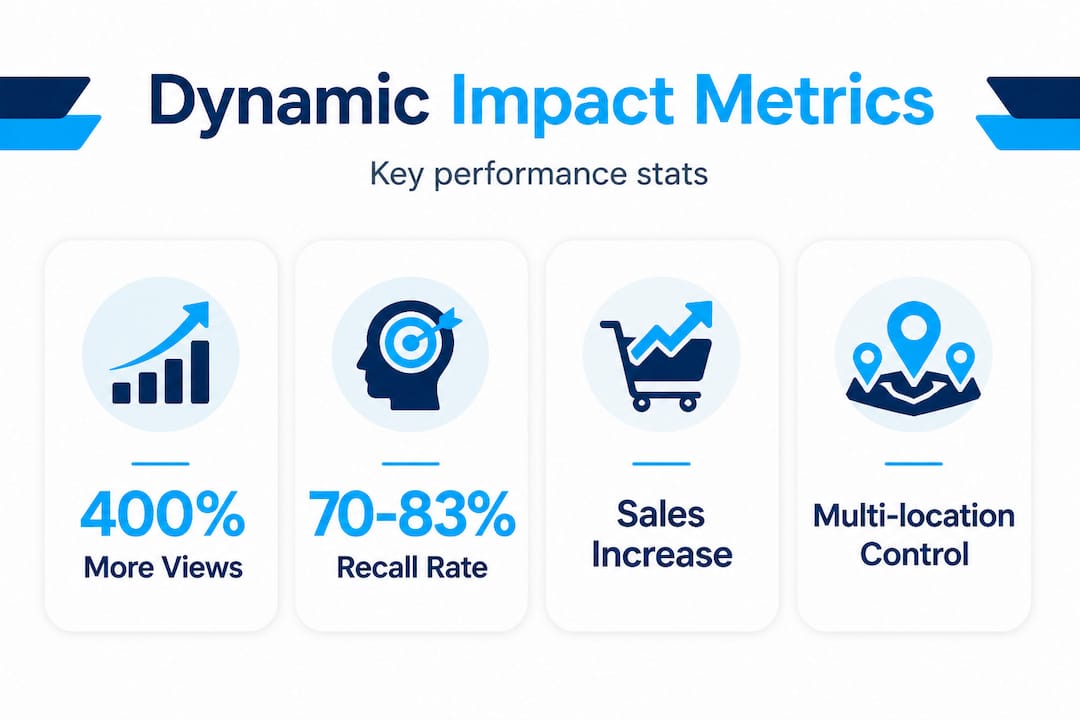
The numbers are compelling. According to benchmarks for digital signage, dynamic signage achieves all of the following:
- 400% more views than equivalent static displays
- 70 to 83 percent recall rate among viewers, compared to much lower rates for static
- 25 to 32 percent retail sales uplift when dynamic promotions are used effectively
- 18 to 30 percent increase in average order value for quick service restaurant (QSR) menu boards
- Up to 400% ROI in the first year of deployment
- Payback period of just 6 to 12 months on initial investment
- 80 percent reduction in printing and production costs
That 400% ROI figure deserves attention. It accounts for the combined effect of higher sales, lower print costs, and reduced staff time spent on manual content updates. For an SMB spending even a modest amount on monthly printing and signage production, the math often favors digital within a single year.
400% ROI in year one. Organizations that switch from static to dynamic signage and actively manage their content strategy consistently report full payback within 6 to 12 months.
To understand your own digital signage ROI, you need to track more than just sales. Measuring the full impact of dynamic content requires a multi-method approach. Expert guidance on measurement recommends combining several tracking methods for a complete picture:
- POS integration: Compare sales of promoted items before and after dynamic content deployment on a per-screen or per-location basis.
- QR codes on displays: Trackable codes let you measure direct response from specific screens and campaigns.
- Dwell time analysis: Camera-based analytics or sensor data can measure how long viewers spend in front of a display, which correlates with engagement depth.
- A/B testing: Run two versions of a promotion across different screen locations or time periods, then compare outcomes. This is one of the most reliable methods for isolating the impact of specific content changes.
Dynamic content also plays a significant role in guest experience. In hospitality settings, personalized digital signage for guest experience drives satisfaction scores and repeat visit rates. Properties that use dynamic wayfinding, hotel dynamic rates, and personalized promotions report measurable improvements in upsell revenue and guest satisfaction.
Practical challenges, pitfalls, and design tips for dynamic signage
Now it is time to address the realities. Common obstacles and best practices are not always highlighted in the initial planning phase, and overlooking them can significantly reduce your return.
High upfront costs and technology dependency are the most frequently cited barriers. Here is a full list of risks to plan for:
- Upfront investment: Hardware, software licenses, and installation can be significant for organizations used to static displays. Budget carefully and phase your rollout.
- Internet and power dependency: Dynamic signage requires reliable connectivity. A screen that goes offline during a key promotion period is worse than no screen at all. Build in redundancy.
- Content overload: More capability does not mean more is better. Screens crammed with animations, tickers, and rotating panels overwhelm viewers. Clean, focused content outperforms cluttered layouts.
- Poor design execution: Dynamic content with weak visual design still underperforms. Use professionally designed templates rather than building from scratch each time.
- Maintenance requirements: Both hardware and CMS software need regular updates, troubleshooting, and attention. Factor this into your resourcing plan.
- Regulatory limits: Outdoor signage in particular is subject to brightness regulations in many jurisdictions. Verify local rules before deploying high-brightness displays.
“Regulatory brightness limits for outdoor digital signage vary by location. Always verify local ordinances before deploying or upgrading outdoor displays to avoid compliance issues.”
Design quality matters enormously. A well-triggered but poorly designed screen will still fail to convert viewers. Interactive display examples show how strong visual hierarchy, limited on-screen text, and clear calls to action consistently outperform text-heavy designs. For structured guidance on layout, the digital display templates guide gives marketing professionals a practical framework for building content that actually works.
Pro Tip: Before scaling to 10 or 20 screens, measure the impact of your first deployment over at least four weeks. Then prioritize your CMS integration based on which triggers drove the clearest results. This avoids investing in sophisticated automation that your audience does not actually respond to.
Why most SMBs undervalue dynamic content—and how to get it right
Building on these practical challenges, here is a perspective on what SMBs consistently get wrong and what a better approach looks like.
Most SMBs evaluate dynamic signage as a cost line, not a revenue driver. They compare the price of a digital screen with the cost of a printed poster and stop there. That framing misses the core value proposition entirely. Dynamic content enhances engagement through real-time relevance: weather-based promotions, live inventory displays, and time-sensitive offers drive measurable lifts in both sales and ROI while reducing the ongoing cost of content updates over time.
The organizations that extract the most value from dynamic signage do something different. They start with a clear, trackable goal (increase average order value by 15 percent, drive trial of a new product, reduce perceived wait time in a queue), and they design their content strategy around that goal from day one. They are not asking “what can we put on the screen?” They are asking “what outcome do we need and what trigger-driven content will produce it?”
There is also a real risk in over-engineering. Expert consensus confirms that dynamic content outperforms static in high-traffic environments but pairing it with static elements for permanent or regulatory information is still best practice. Trying to make every piece of content dynamic adds complexity without proportional benefit.
One underrated strategy is responsible personalization. Audience-triggered content (based on demographics or behavior data) can boost engagement significantly, but it needs to be implemented with explicit attention to data privacy. Transparency about what data you collect and how it influences displays builds trust rather than eroding it. This is especially relevant for healthcare, education, and public-sector organizations managing sensitive audiences.
The organizations winning with dynamic signage right now are those managing multi-location display management from a central dashboard, using automated scheduling to push location-specific content without relying on local staff to update screens manually. That combination of centralized control and locally relevant triggers is where the real efficiency gains live.
Take the next step with DST Connect’s digital signage solutions
If you are ready to put dynamic content principles into action, DST Connect can power your next steps. The platform gives marketing and communications managers everything needed to move from static displays to a fully dynamic, automated signage strategy: over 700 professionally designed templates, a drag-and-drop editor, real-time data feed integrations, and a cloud-based dashboard for managing screens across multiple locations simultaneously.
Getting started is straightforward. Follow the step-by-step digital signage setup guide to configure your first display, then deepen your expertise through the DST Academy for signage, where you can master scheduling, trigger automation, and multi-user management at your own pace. No design degree or IT background required.
Frequently asked questions
How is dynamic content updated in digital signage?
Dynamic content updates via triggers including scheduled times, external data events, and API or webhook-based connections to live data sources like weather feeds, inventory systems, or calendars.
What are the key benefits of dynamic content for SMBs?
Dynamic signage increases engagement by 400% over static displays, boosts product recall to 70 to 83 percent, drives sales uplifts of 25 to 32 percent, and cuts print and production costs by up to 80 percent.
What are common pitfalls with dynamic signage?
High upfront costs, technical dependencies, content overload, and ongoing maintenance are the most common pitfalls, along with poor design choices that reduce the effectiveness of even well-triggered content.
How do you measure ROI from dynamic content?
POS integration, QR code tracking, dwell time measurement, and A/B testing are the most reliable methods for quantifying the sales and engagement impact of dynamic digital signage campaigns.
Is it better to use dynamic or static signage?
Dynamic content outperforms static in engagement and flexibility for promotional and real-time use cases, while static remains cost-effective for permanent information. Most experts recommend a hybrid approach that combines both.
Recommended
- Examples of digital display content to boost engagement
- Content creation tips for signage to boost engagement
- Examples of interactive displays to boost engagement
- What are data-driven displays? Signage impact in 2026
- Digital product strategy for museums engagement
- How to target conferences and trade shows with LED mobile billboards
Enjoyed this blog?
Continue with the previous or next article and discover more ideas, insights and inspiration from DST Connect.