
Engaging content ideas for hospital displays that work
TL;DR:
- Effective hospital digital displays require relevant, clear, timely, accessible, and emotionally impactful content.
- Tailoring content to specific hospital locations and using interactive tools enhances patient engagement and trust.
- Well-managed, location-specific content with clear ownership and regular updates maximizes digital signage benefits.
Hospital digital displays are everywhere, yet most of them fail. Screens loop the same stock photos and outdated announcements while patients sit in waiting rooms, anxious and under-informed. The opportunity is enormous: well-planned display content can reduce perceived wait times, ease patient anxiety, reinforce trust in your care team, and communicate critical health information at exactly the right moment. This article walks healthcare administrators and marketing professionals through a practical framework for evaluating, selecting, and deploying content that genuinely improves the patient experience.
Table of Contents
- How to evaluate content for hospital displays
- Top content ideas for hospital digital displays
- Interactive and personalized content to drive engagement
- Comparison of content types: which works best where?
- What most hospitals miss with digital displays
- Take your hospital displays further with DST Connect
- Frequently asked questions
Key Takeaways
| Point | Details |
|---|---|
| Choose content strategically | Assess audience needs and location context to select the most relevant and impactful display content. |
| Prioritize engagement | Interactive and personalized formats encourage patient and visitor attention and satisfaction. |
| Update displays regularly | Refreshing display content monthly and in real time for alerts keeps information useful and trusted. |
| Match content to location | Different hospital areas require tailored content types for best results. |
How to evaluate content for hospital displays
With a clear need for impactful content, let’s define how to identify the most effective options for hospital environments.
Not all content is equal, and in a healthcare setting, the stakes are higher than in most industries. A poorly chosen loop in a pediatric waiting room feels different from one in a cardiac unit. Before selecting any content type, it pays to run it through a clear set of evaluation criteria.
1. Relevance
Does the content directly relate to the audience in that specific location? A screen in the oncology unit should surface different messages than one near the emergency entrance. Matching content to context is the single most important criterion.
2. Clarity
Medical environments attract a broad audience: elderly patients, non-native speakers, caregivers in distress, and children. Content must communicate its message within three to five seconds of a viewer glancing at the screen. Dense text and small fonts fail this test every time.
3. Timeliness
Static content that hasn’t been refreshed in weeks signals neglect. Engaging, relevant content on digital displays consistently increases viewer attention and satisfaction, and timeliness is a core driver of that relevance. Live feeds, updated schedules, and real-time alerts keep audiences returning their attention to the screen.
4. Accessibility
Consider multilingual support, large font sizes, high-contrast color palettes, and audio options where appropriate. Accessibility is not an add-on; it is a baseline requirement for patient-facing communication.
5. Brand harmony
Every screen is a reflection of your hospital’s brand. Colors, typography, and tone should align with your broader communications strategy. Inconsistent visuals erode trust, even subconsciously.
6. Emotional impact
Healthcare environments carry emotional weight. Content should comfort, reassure, and inform rather than overwhelm. Avoid sensational health statistics or alarming imagery on general patient-facing screens.
Understanding the benefits of digital signage extends well beyond aesthetics. It includes measurable outcomes like reduced perceived wait times and improved compliance with health guidance. Keep these outcomes in mind when building your evaluation checklist.
Pro Tip: Map your busiest foot-traffic windows (morning admission rush, post-lunch visiting hours, early evening discharge peaks) and tailor content scheduling to those demographics. Morning visitors skew toward anxious families; afternoon visitors are more likely to engage with longer, educational content. Use engagement strategies for signage to plan these windows strategically.
Top content ideas for hospital digital displays
Understanding what makes content effective, explore proven and creative ideas for hospital displays.
Creative content formats consistently drive higher engagement rates on displays, and hospitals have more content options available than most administrators realize. The key is matching the right format to the right space and audience.
Here are eight content ideas that perform well in hospital environments:
- Live wait times. Real-time wait time displays in emergency departments and outpatient clinics are among the highest-engagement content types in healthcare. Patients feel respected when they are kept informed. Even a rough estimate reduces anxiety significantly compared to silence.
- Doctor and staff introductions. Short video profiles or photo-and-bio slides introduce patients to the people who will care for them. This humanizes the clinical environment and builds trust before the appointment even begins. A fifteen-second video clip of a physician explaining their specialty goes further than a framed photo ever could.
- Health tips and seasonal wellness content. Rotating health education content tied to the time of year (flu prevention in fall, heat safety in summer, mental health awareness in spring) feels relevant and demonstrates that your hospital is invested in community health beyond its walls.
- Wayfinding and navigation. Large hospital campuses are notoriously difficult to navigate. Dynamic wayfinding maps reduce staff interruptions and patient stress. These displays work best near entrances, elevators, and department junctions.
- Patient testimonials. Carefully curated patient stories (with proper consent) build credibility and emotional connection. Keep these brief: a single quote paired with a calm image is more impactful than a lengthy paragraph.
- Language accessibility aids. Displaying content in multiple languages or including visual symbols alongside text dramatically improves inclusivity. For hospitals in multilingual communities, this is not optional; it is a patient safety issue.
- Event calendars and community programs. Health screenings, support group meetings, and community wellness events deserve prominent promotion. These displays keep patients engaged with your broader mission.
- Calming visuals and nature content. Research in healthcare design consistently finds that images of nature, soft color gradients, and slow-moving visuals reduce patient cortisol levels. Filler time between announcements is an opportunity, not dead air.
Best practice spotlight: The most effective hospital display programs treat every screen as a scheduled editorial product. They assign a content owner, set a refresh calendar, and review analytics quarterly. Screens without an owner tend to become wallpaper within six months.
Pro Tip: Use dynamic or localized interactive display examples to tailor content by floor, department, or time of day. A cloud-based CMS (content management system) with scheduling capabilities makes this manageable even for small marketing teams. Explore content creation tips for practical guidance on building a sustainable content calendar.
Interactive and personalized content to drive engagement
Beyond static content, interactive and personalized formats offer unique engagement benefits.
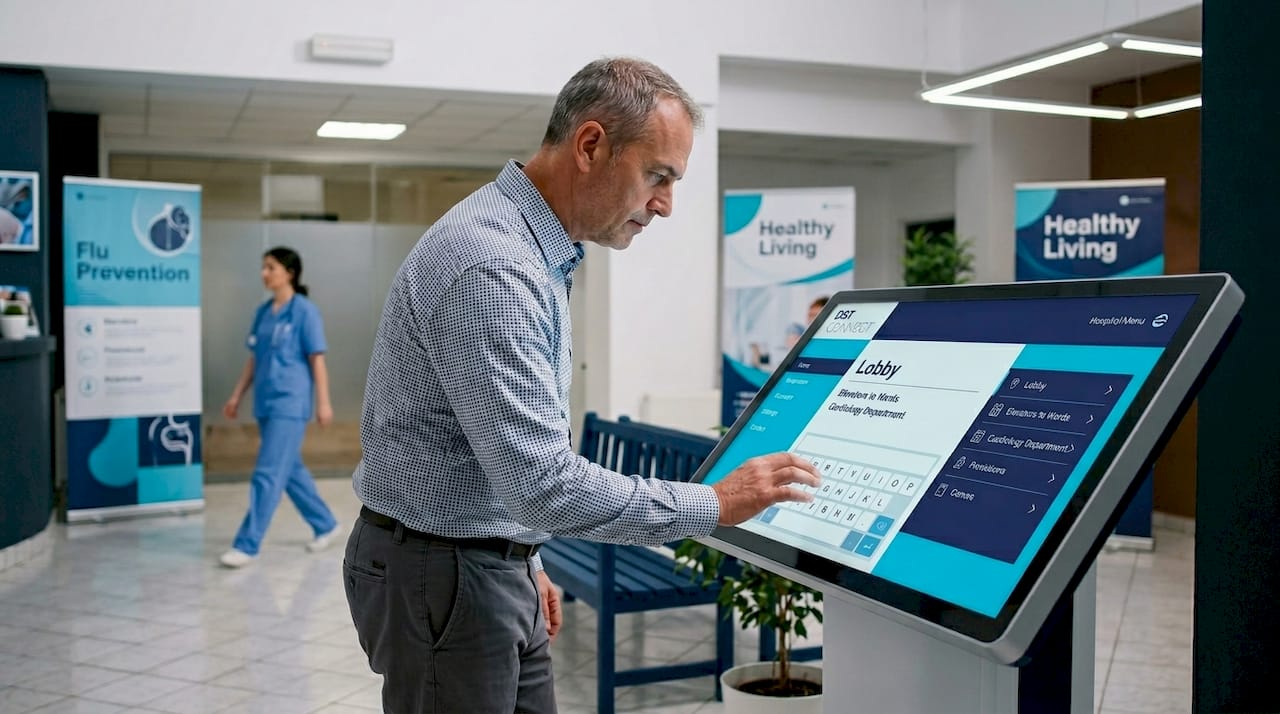
Static displays inform. Interactive displays engage. The distinction matters because engaged patients are more likely to retain health information, comply with pre-appointment instructions, and report higher satisfaction scores. Interactive and personalized content formats increase the likelihood of patient engagement measurably.
What interactivity looks like in a hospital context:
- Touchscreen wayfinding kiosks allow patients to search for departments, print directions, and find parking information without asking a staff member. These reduce front-desk bottlenecks during peak hours.
- Patient check-in surveys deployed on lobby screens or waiting room tablets capture real-time satisfaction data and give patients a sense of agency in their care experience.
- Health quizzes and assessments on waiting room screens keep patients mentally engaged while introducing health literacy content in a low-pressure format.
- Language preference selectors on interactive screens allow patients to choose their preferred language, ensuring that critical procedural information reaches them clearly.
What personalization looks like in practice:
Personalized content does not require patient data integration to be effective. Even simple time-based personalization (good morning greetings, lunch-hour nutrition tips, evening visiting hour reminders) makes a screen feel relevant. Hospitals with advanced CMS platforms can connect displays to appointment scheduling systems to surface relevant department-specific information for patients checking in.
| Interactive feature | Primary benefit | Key engagement metric |
|---|---|---|
| Touchscreen wayfinding | Reduces navigation stress | Staff interruptions reduced by up to 30% |
| Real-time wait displays | Manages expectations | Perceived wait time reduction |
| Language selectors | Improves accessibility | Broader audience reach |
| Check-in survey kiosks | Captures patient feedback | Response rates vs. paper surveys |
| Health quizzes | Boosts health literacy | Dwell time increase |
| QR code health resources | Extends engagement off-screen | Scan-to-engagement conversion rate |
The data is consistent: screens that invite participation outperform passive display loops. Even a simple QR code linking to digital display content examples or a patient resource page transforms a one-way broadcast into a two-way communication tool.
Comparison of content types: which works best where?
With many options available, context matters. Let’s compare where each content type excels in hospital settings.
Different areas in a hospital benefit substantially from tailored display content types. A blanket content strategy applied uniformly across all screens misses the opportunity to serve each audience segment effectively.
| Location | Announcements | Health education | Interactive tools | Entertainment | Recognition boards |
|---|---|---|---|---|---|
| Main lobby | Excellent | Good | Good | Fair | Good |
| Waiting areas | Good | Excellent | Excellent | Excellent | Fair |
| Hallways | Good | Good | Poor | Poor | Good |
| Patient rooms | Fair | Excellent | Good | Excellent | Poor |
| Staff lounges | Excellent | Fair | Poor | Good | Excellent |
A few location-specific observations are worth calling out:
- Main lobby: This is your highest-visibility, highest-traffic zone. Lead with wayfinding, live wait times, and brand messaging. Keep content moving quickly; lobby visitors typically have a destination in mind and won’t linger.
- Waiting areas: These screens have the most sustained attention from the most anxious audience in your building. Prioritize calming visuals, health education, and interactive content. This is where the patient experience is won or lost.
- Hallways: Viewing windows are short (two to four seconds). Use bold, high-contrast visuals with a single clear message per screen. Staff recognition and directional content perform well here.
- Patient rooms: Content needs to be genuinely comforting and useful. Entertainment options, care instructions for the current department, and wellness education earn sustained attention. Avoid promotional content; patients in their rooms are vulnerable and trust-sensitive.
- Staff lounges: Recognition boards, internal announcements, and staff wellness content build morale and culture. This space is often neglected in display strategy, yet it is one of the highest-return opportunities for internal communications.
Using well-designed digital display templates can significantly speed up the process of deploying location-specific content without requiring a dedicated design team for every screen.
Key strengths and limitations to keep in mind:
- Entertainment content works best where dwell time is long, not in hallways or lobbies.
- Recognition boards require consistent updating to stay motivating; outdated recognition is worse than none.
- Interactive tools need regular maintenance checks; a frozen touchscreen kiosk damages patient trust quickly.
- Health education content must be reviewed for medical accuracy by clinical staff before deployment.
What most hospitals miss with digital displays
Most hospital digital signage programs start with hardware decisions. Administrators choose screen sizes, mounting positions, and display resolution before they have thought carefully about what will actually appear on those screens. The result is high-quality hardware running low-quality content.
This is the most common and costly mistake in hospital display strategy.
The reality is that a well-managed 1080p screen showing relevant, updated, emotionally intelligent content outperforms a UHD display running a stale loop every single time. Technology is the vehicle. Content is the message. And most hospitals over-invest in the vehicle.
Over-customized or irrelevant content underperforms even with advanced technology. This insight challenges the common assumption that more sophisticated displays automatically produce better outcomes. They do not. They just make irrelevant content look sharper.
The second missed opportunity is localization. Many hospitals run identical content across every screen in the building. A single content loop deployed in the main lobby, the pediatric ward, and the oncology unit treats very different patient populations as identical. That is not communication; it is broadcasting.
The third pitfall is governance. Who owns each screen? Who approves content updates? Without a clear content governance structure, displays drift toward neglect. The staff member who volunteered to “manage the screens” burns out, updates stop, and the displays become invisible infrastructure.
Sustainable signage content creation requires three things: a content calendar, a responsible owner for each screen cluster, and a quarterly review process. These are operational commitments, not technical ones. No amount of software investment replaces them.
The most effective hospital display programs we have seen treat their screens the same way they treat their patient communications teams: with assigned responsibilities, regular performance reviews, and clear standards for quality and relevance. That discipline is what separates displays that work from displays that go unnoticed.
Take your hospital displays further with DST Connect
Having explored content strategies, now discover how DST Connect helps you bring these ideas to life. DST Connect is a user-friendly digital signage platform built for organizations that need to manage multiple screens across complex environments, exactly like hospital campuses. With over 700 professionally designed templates, a drag-and-drop content editor, and a cloud-based dashboard that lets you manage screens from any location, your team can deploy and update content without needing technical or design expertise. Start a free trial of the digital signage software and see how fast you can move from concept to live display. For teams who want to build deeper expertise, the DST Academy training offers structured learning to help you get the most from every screen in your facility.
Frequently asked questions
What types of content are most effective for hospital waiting room displays?
Live wait times and staff introductions keep patients informed and reduce perceived wait times, making them among the highest-performing content types in waiting room settings. Wellness tips and calming visuals round out a well-balanced content loop.
How often should hospital display content be updated?
Timely updates are key to maintaining engagement; update general content at least monthly, but push health alerts, event calendar changes, and emergency notices in real time to maintain relevance and trust.
Can hospital displays be personalized for different demographics?
Yes, personalization features increase engagement and accessibility significantly. Language preference options, time-based greetings, and department-specific content are practical personalization strategies that do not require complex technical integrations.
What content helps lower patient anxiety during hospital visits?
Wellness education and calming visuals are consistently shown to reduce stress in waiting areas. Clear wayfinding information and transparent wait time displays also ease anxiety by giving patients a sense of control over their experience.
Recommended
Enjoyed this blog?
Continue with the previous or next article and discover more ideas, insights and inspiration from DST Connect.