
Cloud-based dashboards explained: simplify digital signage
TL;DR:
- Cloud-based dashboards enable remote, instant management of digital signage across multiple locations.
- They significantly reduce update times, manual errors, and operational costs compared to traditional methods.
- Ongoing team training and regular platform reviews maximize the benefits of cloud signage management.
Managing digital signage across five locations sounds straightforward until you realize every screen update requires a separate trip, USB drive, or phone call to a local staff member. For marketing and operations managers, that manual process quietly drains hours every week. Cloud-based dashboards have fundamentally changed how organizations handle this challenge, making it possible to update every screen in every location from a single browser window. This article breaks down exactly what a cloud-based dashboard is, how it works, how it compares to traditional methods, and how to choose and use the right platform for your organization.
Table of Contents
- What is a cloud-based dashboard?
- How cloud-based dashboards work: a step-by-step guide
- Comparing cloud dashboards to traditional signage management
- Choosing the right cloud-based dashboard for your organization
- Best practices for maximizing cloud dashboard impact
- Our take: what most managers miss with cloud dashboards
- Start streamlining your signage with a cloud-based dashboard
- Frequently asked questions
Key Takeaways
| Point | Details |
|---|---|
| Centralized control | Cloud-based dashboards let you manage all digital signage content from one place, saving time. |
| Increased efficiency | Automated updates and real-time control reduce manual work and costly errors. |
| Scalable for any business | Whether you run a single location or hundreds, cloud dashboards adapt easily to your needs. |
| Data-driven decisions | Built-in analytics help you measure what works so you can improve your signage strategy. |
| Staff empowerment | With proper training, your team can take full advantage of dashboard tools for greater impact. |
What is a cloud-based dashboard?
A cloud-based dashboard is an online control panel that lets you manage digital signage content remotely through any internet-connected device. Instead of storing software or media files on a local server or individual screen, everything lives in the cloud. You log in from your laptop, tablet, or phone and instantly see all your connected screens, regardless of where they are located.
For digital signage specifically, cloud signage overview means managers can control digital signage remotely via the internet, without sending anyone on-site. That single capability removes one of the biggest operational headaches in multi-location display management.
A well-built cloud-based dashboard typically includes these core components:
- User interface (UI): A clean, visual control panel where you browse content, select screens, and configure settings without needing technical skills.
- Content management system (CMS): The engine behind uploading, organizing, and distributing media files like images, videos, and slideshows.
- Content scheduling: A calendar-style tool that lets you set content to appear on specific screens at specific times, automatically.
- User permissions: Role-based access controls so team members only see and edit what they are authorized to manage.
- Analytics: Real-time reporting on screen uptime, content playback, and audience engagement.
Stat to know: A remote dashboard can reduce signage update time by up to 60% compared to manual processes, making it one of the highest-impact tools for operations teams.
The difference from on-premises solutions is significant. Traditional local systems require physical access or a private network. Cloud dashboards require nothing more than a login. That shift in architecture is what makes real-time updates across dozens of locations genuinely achievable.
How cloud-based dashboards work: a step-by-step guide
With a clear definition in place, it helps to walk through exactly how these platforms operate day to day. The workflow is simpler than most managers expect.
- Log in: Access the dashboard through a web browser or app using your credentials. No installation required.
- Upload or select content: Drag and drop images, videos, or data feeds into the platform, or choose from a library of pre-approved templates.
- Assign content to screens: Select individual displays, groups of screens, or all locations at once. Centralized content updates allow instant updates to multiple screens from a single interface.
- Schedule displays: Set start and end times, repeat cycles, and dayparting rules so content automatically rotates without manual input.
- Monitor analytics: Review screen uptime, content performance, and any error alerts from the same dashboard.
Role-based permissions are especially valuable for multi-location teams. A regional manager might have full editing rights across all sites, while a store associate can only update a specific menu board at their location. This structure prevents unauthorized changes without slowing down day-to-day content updates.
Cloud dashboards also integrate with a wide range of device types. Whether your screens are in a corporate lobby, a retail floor, a restaurant, or a hospital waiting room, the dashboard connects to Android media players, Windows devices, and URL-based players. For a practical look at retail signage management and how this works in real environments, the workflow remains consistent across industries.
You can also streamline signage workflow for high-frequency content environments like restaurants, where menus, promotions, and daily specials change constantly.
Pro Tip: Build a library of branded templates for your most common content types. Routine updates like weekly promotions or shift reminders take minutes instead of hours when the design work is already done.
Comparing cloud dashboards to traditional signage management
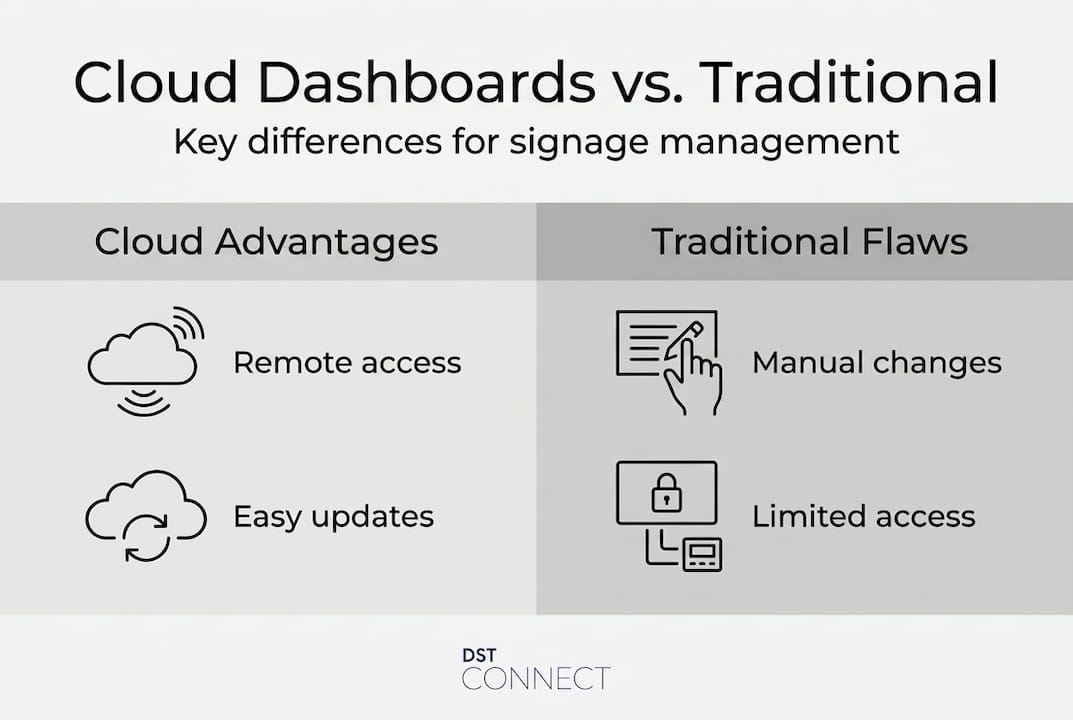
Understanding the workflow makes it easier to see just how different cloud-based management is from older approaches. Here is a direct comparison across the dimensions that matter most to operations and marketing teams.
| Feature | Cloud-based dashboard | Traditional/manual management |
|---|---|---|
| Update speed | Instant, remote | Hours to days, requires physical access |
| Labor required | Minimal, one person can manage all screens | High, staff needed at each location |
| Scalability | Easily scales to hundreds of screens | Grows linearly with headcount |
| Error risk | Low, centralized control | High, inconsistent updates per site |
| Reliability | Monitored remotely, alerts on issues | Issues may go unnoticed for hours |
| Cost over time | Predictable subscription model | Higher ongoing labor and travel costs |
Manual vs. cloud updates show a clear gap: cloud dashboards significantly reduce manual errors and update times compared to legacy systems.
“Manual signage updates waste valuable man-hours that could be better spent on strategy.”
That said, traditional management is not always obsolete. Organizations with a single fixed location and very infrequent content changes may not see enough return to justify a cloud platform. But for anyone managing two or more locations, the cost-benefit math shifts quickly in favor of cloud.
For teams running benefits for office displays, the ability to push emergency updates, brand-wide announcements, or compliance messages in seconds is not just convenient. It is operationally critical.
Choosing the right cloud-based dashboard for your organization
With a solid understanding of how cloud dashboards compare, the next step is selecting the right one. Not all platforms are built equally, and the wrong choice can create more friction than it solves.
Here are the core criteria to evaluate:
- Ease of use: Can non-technical staff navigate the platform without IT support? Signage dashboard must-haves confirm that user-friendly interfaces and robust analytics are top priorities for organizations selecting cloud signage platforms.
- Integration: Does it connect with your existing hardware, data feeds, and third-party tools like Google Sheets, social media, or weather services?
- Security: Look for SSL encryption, two-factor authentication, and role-based access controls.
- Analytics: Can you track screen uptime, content performance, and audience engagement? Weak analytics means flying blind.
- Customer support: Is there a dedicated support team, documentation, and training resources available?
- Scalability: Will the platform handle your growth from 10 screens to 100 without a platform migration?
| Evaluation factor | Small org (1-5 locations) | Mid-size org (5-25 locations) | Large org (25+ locations) |
|---|---|---|---|
| Ease of use | Critical | Important | Important |
| Multi-user roles | Helpful | Critical | Critical |
| Advanced analytics | Optional | Important | Critical |
| API/integrations | Optional | Helpful | Critical |
| Dedicated support | Helpful | Important | Critical |
For businesses in hospitality, reviewing enhancing guest experience use cases helps clarify which dashboard features translate directly into better customer interactions. For food service, dynamic menu board essentials offer a focused look at what menu-specific signage management requires.
Pro Tip: Always test the dashboard on a mobile device before committing. If you cannot approve a last-minute content change from your phone in under two minutes, the platform may slow you down when it matters most.
Best practices for maximizing cloud dashboard impact
Choosing the right platform is step one. Getting consistent value from it requires deliberate setup and ongoing attention. Here is a practical approach:
- Set up thoughtfully from day one: Map out your screen groups, content categories, and user roles before uploading a single file. A well-organized dashboard is dramatically easier to manage at scale.
- Review content regularly: Schedule a monthly audit of all active content. Outdated promotions or stale announcements erode the credibility of your displays.
- Train your team: Ongoing training ensures teams fully utilize dashboard automation and analytics. A platform is only as powerful as the people using it.
- Use analytics actively: Do not just collect data. Review screen uptime, scheduling accuracy, and content completion rates. Act on what you find.
- Adapt as you grow: As your organization adds locations or screen types, revisit your permission structures and template library. What worked for five screens may need adjustment at fifty.
For staff training for signage teams in fast-moving environments, structured onboarding dramatically shortens the time to confident, independent use.
Pro Tip: Schedule a quarterly dashboard health check. Review user roles, archived content, and integration connections to catch any configuration drift before it creates problems.
The most common pitfall is treating the dashboard as a one-time setup. Organizations that configure the platform once and never revisit it typically see declining content relevance and missed scheduling opportunities within six months.
Our take: what most managers miss with cloud dashboards
After working with organizations of all sizes, the pattern is consistent. Most managers spend significant time evaluating features and almost no time planning for ongoing use.
The result? Platforms that are genuinely powerful but used at 30% of their capacity. Teams revert to manual workarounds. Analytics go unread. Templates get ignored. The dashboard becomes just another subscription.
The real differentiator is not which platform you choose. It is how deliberately you use it. Organizations that schedule regular workflow reviews, invest in team training, and treat their dashboard as a living tool consistently outperform those that do not. As we see it: “Dashboards are not a set-it-and-forget-it solution. Their real value comes from deliberate, ongoing use.”
Look at real-world signage workflow advice from high-volume content environments. The teams getting the most from their dashboards are the ones who revisit, refine, and retrain regularly. That discipline is not complicated. But it requires intent.
If you are evaluating platforms right now, factor in the vendor’s training resources and support culture as heavily as the feature list. A simpler platform with excellent onboarding will outperform a feature-rich tool with poor documentation every single time.
Start streamlining your signage with a cloud-based dashboard
Ready to move from manual screen management to centralized, cloud-based control? DST Connect offers a user-friendly digital signage platform built for exactly this challenge. With over 700 professionally designed templates, a drag-and-drop editor, and multi-location screen management across Android, Windows, and URL-based players, it covers what marketing and operations teams actually need.
Explore the DST Connect instructions to see how the platform is set up and configured for real-world use. For teams that want to build genuine platform expertise, DST Academy training provides structured learning resources to get your team confident and capable quickly. Request a demo or reach out to the support team to take the next step.
Frequently asked questions
What is a cloud-based dashboard for digital signage?
It is an online platform that lets you manage and update digital signage content remotely across multiple locations, in real time. Cloud-based dashboards allow remote content management without requiring physical access to each screen.
How does a cloud-based dashboard improve efficiency?
It streamlines updates, reduces manual errors, and lets you schedule content for all screens from a single interface. Cloud dashboards reduce manual errors and boost efficiency compared to traditional methods.
Can cloud dashboards work with different screen types and locations?
Yes, most cloud dashboards support various display types and allow centralized management across sites and offices. Cloud dashboards integrate with different devices and locations through standard connectivity protocols.
What should I look for in a cloud-based dashboard?
Prioritize ease of use, security, analytics, customer support, and scalability to fit your organization’s size and growth plans. User-friendly interfaces and analytics are key dashboard priorities for organizations of all sizes.
How do I train my team to use a cloud dashboard effectively?
Ongoing training and structured academy-style resources help teams maximize automation and analytics features. Continuous training brings full dashboard value by closing the gap between available features and actual daily use.
Recommended
Enjoyed this blog?
Continue with the previous or next article and discover more ideas, insights and inspiration from DST Connect.