What are digital notice boards? A guide for organizations
Paper bulletin boards were never designed for the pace of modern organizations. By the time someone prints an update, walks to the board, and pins it up, the information may already be outdated. Digital notice boards are electronic displays that replace traditional paper bulletin boards by showing announcements, schedules, images, videos, and alerts in real time via remote software updates. This guide walks you through everything you need to know: what digital notice boards are, how they work, where they deliver the most value, and how to deploy them successfully across your organization.
Table of Contents
- What is a digital notice board?
- How digital notice boards work: Mechanics and workflow
- Key use cases in retail, hospitality, healthcare, and education
- Deployment: Steps, methods, and critical IT considerations
- Challenges, real-world lessons, and measuring success
- Our take: What most organizations miss about digital notice boards
- Get started with digital notice boards today
- Frequently asked questions
Key Takeaways
| Point | Details |
|---|---|
| Instant communication | Digital notice boards allow for real-time updates, replacing slow, manual processes. |
| Higher engagement | Multimedia and interactive content drive significantly more viewer engagement than static paper boards. |
| Cross-sector impact | Retail, healthcare, hospitality, and education all benefit through improved satisfaction and measurable ROI. |
| Plan for success | Effective deployments require IT and content collaboration, security planning, and ongoing content updates. |
| ROI proven | Organizations often recoup investments in under two years through increased sales and operational efficiency. |
What is a digital notice board?
A digital notice board is a screen-based communication tool that replaces the static corkboard with dynamic, updatable content. Instead of printed flyers and handwritten notes, you get a live display that can show anything from staff announcements and event schedules to emergency alerts and video content.
Digital notice boards consist of display screens, media players, a content management system (CMS), and network connectivity, all working together to deliver multimedia announcements and real-time updates. Each component plays a specific role:
- Display screen: The physical output, ranging from standard LCD panels to large-format UHD or OLED displays
- Media player: The hardware or software that decodes and renders content on screen
- CMS: The platform where content is created, organized, and scheduled
- Network connection: The link between the CMS and the display, either via Wi-Fi, Ethernet, or cellular
Content types supported include images, videos, scrolling text, live data feeds, RSS news, social media streams, and emergency alerts. This flexibility is what separates digital notice boards from their paper predecessors.
Understanding cloud CMS basics is especially useful here, because most modern systems are cloud-based, meaning you manage everything from a browser without needing on-site software installations.
| Feature | Paper notice board | Digital notice board |
|---|---|---|
| Update speed | Hours or days | Minutes |
| Content types | Text and images | Video, data feeds, alerts |
| Remote management | Not possible | Yes, from anywhere |
| Scalability | Manual per location | Centralized across sites |
| Engagement | Low | High |
For IT managers, the shift from analog to digital also means new responsibilities around network setup and display performance. Reviewing display optimization tips early in the planning phase helps avoid common technical pitfalls later.
How digital notice boards work: Mechanics and workflow
Now that you know the main parts of a digital notice board, here is a closer look at how the content lifecycle really works.

Content is created and scheduled in a cloud CMS, then pushed to screens remotely, enabling updates in minutes rather than hours. That speed advantage is significant for any organization managing time-sensitive information.
Here is the typical workflow from start to screen:
- Create: Design content using templates, drag-and-drop editors, or imported media files
- Upload: Add content to the CMS library, tagged and organized by category or location
- Schedule: Set start and end times, assign content to specific screens or screen groups
- Approve: Optional review step for organizations with content governance policies
- Publish: The CMS pushes content to the assigned displays automatically
- Monitor: Track playback logs, screen status, and engagement metrics from the dashboard
For IT teams, the key responsibilities include setting up secure network access (often using a dedicated VLAN for signage traffic), defining content policies, and managing user permissions within the CMS. Most platforms support role-based access, so a department manager can update their own screen without touching content on other displays.
Rich media integration is another major advantage. You can connect live data feeds, weather widgets, calendar apps, and emergency alert systems directly into your content management strategies to keep displays relevant without manual effort.
Following deployment best practices from the start reduces the risk of network bottlenecks and content delivery failures, especially in multi-location environments.
Pro Tip: Automate recurring content like daily menus, shift schedules, or weather updates using data feed integrations. Standardize file naming conventions in your CMS from day one to save hours of searching later.
Key use cases in retail, hospitality, healthcare, and education
With the mechanics clear, let us explore where digital notice boards really shine across specific industries.
Digital notice boards improve outcomes across sectors: healthcare sees a 35% reduction in perceived wait times, while retail experiences up to 32% sales growth from dynamic promotional displays. These are not marginal gains. They reflect a fundamental shift in how organizations communicate with both staff and visitors.
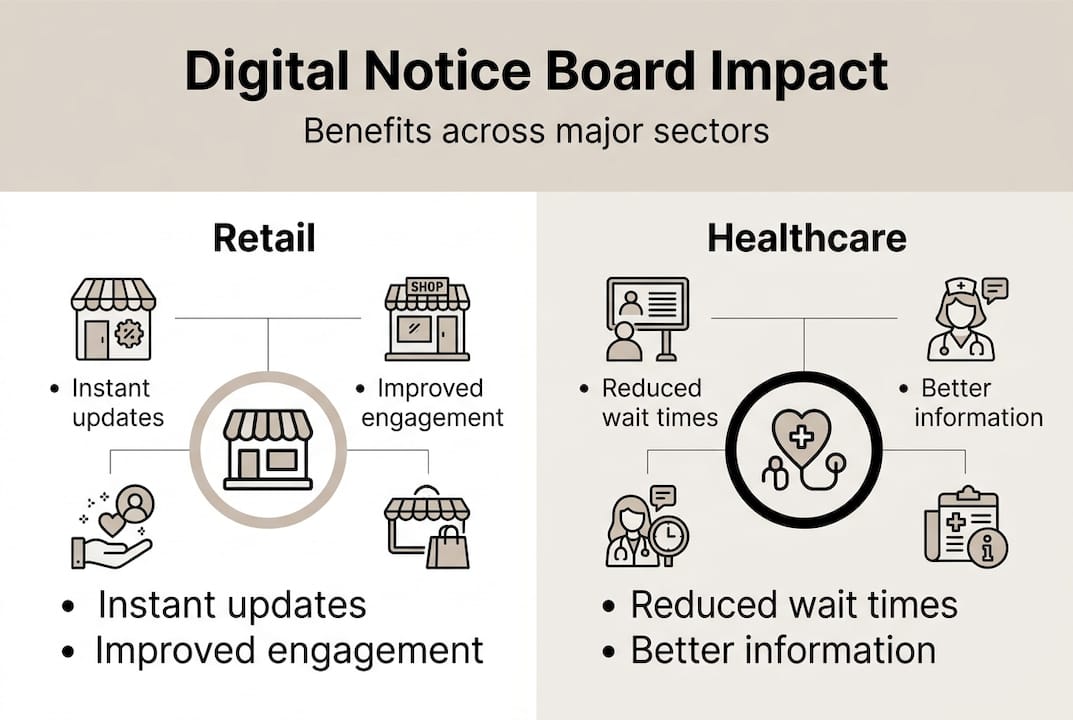
Each sector uses digital notice boards differently: retail for promotions, hospitality for wayfinding and menus, healthcare for patient education and alerts, and education for event schedules and campus news.
| Sector | Primary use | Key outcome |
|---|---|---|
| Retail | Promotions, pricing, offers | Up to 32% sales growth |
| Hospitality | Wayfinding, menus, events | Improved guest satisfaction |
| Healthcare | Alerts, education, wayfinding | 35% shorter perceived wait times |
| Education | Schedules, events, safety | Higher student engagement |
| Corporate | Internal comms, KPIs | 37% engagement boost |
“Organizations that adopt digital signage for internal communications report that up to 57% of staff feel better informed, driving measurable gains in engagement and operational efficiency.”
Here is a quick breakdown of sector-specific benefits:
- Retail: Promote flash sales in real time, update pricing without reprinting, and drive impulse purchases with video content
- Hospitality: Display live menus, room availability, and event schedules to reduce front-desk inquiries
- Healthcare: Deliver patient education content, alert staff to emergencies, and guide visitors with 88% reporting wayfinding value from digital displays
- Education: Share campus news, class cancellations, and safety alerts instantly across multiple buildings
For hospitality teams specifically, understanding how digital signage enhances guest experience is a strong starting point for building a business case internally.
Deployment: Steps, methods, and critical IT considerations
Understanding use cases sets the context. Now, here is what it takes to actually deploy digital notice boards successfully.
Successful deployment involves four core phases: planning (requirements and stakeholders), pilot testing, phased rollout, and ongoing optimization including training and security reviews. Skipping any phase increases the risk of costly rework.
Here are the key deployment steps:
- Define requirements: Identify locations, content types, update frequency, and user roles
- Select hardware and software: Match display size and media player specs to the environment
- Set up the network: Configure VLAN segmentation, bandwidth allocation, and offline cache for uninterrupted playback
- Run a pilot: Deploy in one location, gather feedback, and resolve issues before scaling
- Phased rollout: Expand location by location with documented processes and staff training
- Optimize: Review content performance, refresh schedules, and update security policies regularly
Critical technical must-haves for IT managers:
- Encrypted data transmission between CMS and displays
- Role-based access control to prevent unauthorized content changes
- Offline playback cache so screens stay active during network outages
- Regular firmware and software updates for all media players
- Centralized monitoring dashboard for real-time screen status alerts
Pro Tip: Build scalability into your architecture from day one. Use a CMS that supports unlimited screen groups and automates content metrics tracking so you can measure impact without manual reporting.
Reviewing a detailed signage rollout guide before your pilot phase helps identify infrastructure gaps early. Also, aligning your team on content workflow tips ensures the right people are creating and approving content from the start. Tracking digital signage adoption trends can also help you build a stronger internal business case.
Challenges, real-world lessons, and measuring success
Once deployment is in motion, organizations need to sustain momentum. Here is what to watch out for and how to ensure lasting value.
Upfront costs are higher than paper, but ROI is typically realized within 12 to 24 months. The key is tracking engagement and content freshness consistently to prove ongoing value to stakeholders.
Digital notice boards deliver 83% better message recall compared to static displays, and corporate environments report a 37% boost in employee engagement. Those numbers only hold if content stays relevant and fresh.
Common pitfalls and how to address them:
- Content staleness: Set expiry dates on all content and assign content owners per department
- Network outages: Enable offline cache so screens display the last scheduled content during downtime
- Security vulnerabilities: Enforce encrypted connections and audit user access quarterly
- Legacy system integration: Use API-compatible CMS platforms that connect with existing HR or scheduling tools
- Accessibility gaps: Include closed captions and high-contrast visuals to meet accessibility standards
Metrics worth tracking include screen uptime percentage, content play frequency, viewer dwell time, and any measurable lift in sales or satisfaction scores before and after deployment. Reviewing interactive display examples gives you a clearer picture of what high-performing content looks like in practice.
Pro Tip: Avoid the “set and forget” trap. Schedule a weekly 15-minute content review with your communications team and use signage ROI benchmarks to set realistic performance targets from the start.
Our take: What most organizations miss about digital notice boards
Most organizations treat digital notice board deployment as a one-time IT project. Install the screens, configure the CMS, hand it over to the comms team, and move on. That approach consistently underdelivers.
The organizations that get the most out of digital notice boards treat them as living communication platforms, not hardware installations. That means weekly content reviews, shared ownership between IT and content leads, and regular metric check-ins to understand what is actually resonating with staff or visitors.
Here is the uncomfortable truth: hardware specs matter far less than content quality. A premium OLED display running stale, poorly designed content will underperform a basic LCD screen running fresh, well-targeted messaging. Investing in content strategy insights early pays off more than upgrading hardware later.
The organizations that outperform their peers are the ones where IT and communications teams meet regularly, share data, and iterate on content together. That cross-functional discipline is what turns a digital notice board from a screen on a wall into a genuine business asset.
Get started with digital notice boards today
Ready to modernize your communications? DST Connect offers an end-to-end digital signage platform built for organizations of all sizes. With over 600 professionally designed templates, an intuitive drag-and-drop editor, and a cloud-based dashboard for managing screens across multiple locations, getting started is straightforward. The platform is compatible with Android, Windows, and URL-based media players, so it fits your existing infrastructure. Explore the full range of signage software solutions or browse compatible hardware options to find the right setup for your environment. Start a free trial today and see how DST Connect simplifies digital notice board management from day one.
Frequently asked questions
What makes digital notice boards better than traditional bulletin boards?
Digital notice boards streamline communication through instant, centralized, multimedia updates, eliminating the manual labor of printing, posting, and removing paper notices. They also support video and live data feeds, which paper simply cannot match.
How quickly can content be updated on digital notice boards?
Content can be updated remotely in just 1 to 5 minutes using cloud-based software, from any location with internet access. That is a fraction of the time required for manual paper updates.
What are the key IT challenges with digital notice boards?
Common technical challenges include integrating with legacy systems, maintaining network reliability, enforcing security protocols, and ensuring content stays current across all screens. Planning for these in the pilot phase reduces risk significantly.
What sectors benefit most from digital notice boards?
Retail, hospitality, healthcare, education, and corporate offices all see measurable gains. Digital notice boards improve satisfaction and operational efficiency across these sectors through faster communication and more engaging content formats.
How is ROI measured for digital notice board projects?
ROI from digital signage is typically realized within 12 to 24 months and is measured by tracking engagement lift, message recall rates, sales increases, and staff satisfaction scores before and after deployment.
Recommended
Enjoyed this blog?
Continue with the previous or next article and discover more ideas, insights and inspiration from DST Connect.