
Step-by-step display content management for clear communication
TL;DR:
- Effective digital display management requires a structured process for content creation, scheduling, and monitoring.
- Regular updates, branded templates, and performance tracking improve audience engagement and brand consistency.
- Ongoing review and optimization are essential for maximizing the impact of digital signage strategies.
Managing digital display content across multiple locations is harder than it looks. When screens show outdated promotions, mismatched branding, or messages that miss their intended audience, the problem is rarely the hardware. It is the process behind the content. Marketing managers and communication directors at medium to large organizations need a clear, repeatable system to keep every screen relevant and on-brand. This guide walks you through preparation, execution, and verification so your digital displays consistently deliver the right message to the right audience at the right time.
Table of Contents
- Understanding digital display content management
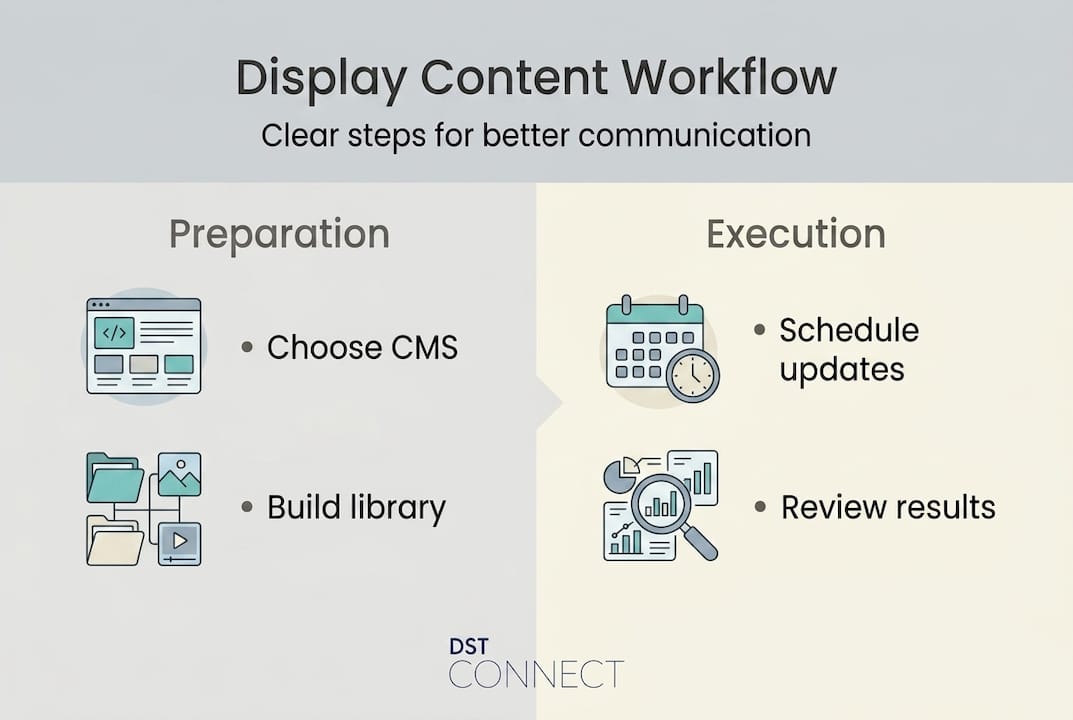
- Preparing for success: prerequisites and planning
- Executing your step by step content management workflow
- Verifying success and optimizing over time
- A smarter approach to ongoing content management
- Explore proven digital signage solutions
- Frequently asked questions
Key Takeaways
| Point | Details |
|---|---|
| Plan before executing | Strategic planning and tool selection set the foundation for effective content management. |
| Follow a step-by-step workflow | A structured process improves communication clarity and streamlines deployment at scale. |
| Measure and optimize regularly | Tracking KPIs and making incremental improvements keeps messaging fresh and impactful. |
| Standardize assets and templates | Consistent design across locations increases trust and reduces content creation workload. |
| Engage cross-functional teams | Involving multiple departments leads to more agile and effective digital communication. |
Understanding digital display content management
Before building any workflow, it helps to define what we are actually talking about. Digital display content management is the organized practice of creating, scheduling, updating, and monitoring content that appears on digital screens throughout an organization. This covers everything from lobby welcome screens and meeting room displays to retail promotional boards and employee communication panels.
Digital signage itself refers to the network of screens, media players, and software that work together to deliver visual content. A CMS, or content management system, is the software layer that lets teams control what appears on those screens, when it appears, and for how long. Most modern platforms offer cloud-based dashboards that let you manage hundreds of screens from a single login, regardless of geographic location.
Why does structured content management matter? Because the alternative is chaos. Organizations that manage digital displays without a clear process often end up with screens that show content intended for a different region, promotions that expired weeks ago, or internal messages that never reached the intended department. Digital signage enhances guest experience and is increasingly used for both internal and external communication, which means the stakes for getting it right are higher than ever.
Here is a quick look at the main challenges organizations face and how structured content management addresses each one:
| Challenge | Impact without structure | Benefit with structured management |
|---|---|---|
| Outdated content on screens | Damages credibility, confuses audiences | Automated scheduling keeps content current |
| Inconsistent branding | Weakens brand identity across locations | Standardized templates ensure visual consistency |
| Manual update processes | High time cost, high error rate | Bulk scheduling and automation reduce workload |
| Poor audience targeting | Generic messaging reduces engagement | Location-based content rules improve relevance |
| No performance visibility | No way to improve what you cannot measure | Analytics dashboards surface engagement data |
The key benefits of structured digital display content management for medium to large organizations include:
- Efficiency: Centralized control reduces the time spent on individual screen updates
- Consistency: Brand guidelines and approved templates prevent off-brand content from going live
- Scalability: Cloud-based platforms support growth from 10 screens to 1,000 without rebuilding your process
- Targeted communication: Audience segmentation allows different content for different locations or departments
- Compliance: Approval workflows ensure content meets legal, regulatory, or brand standards before publishing
The growing demand for digital signage across retail, healthcare, hospitality, and corporate environments means organizations that invest in structured content management now will be far better positioned as their screen networks expand.
Preparing for success: prerequisites and planning
With a clear picture of what content management involves, the next step is preparation. Rushing into execution without a solid foundation is one of the most common reasons digital signage programs underperform. Before you create a single piece of content, work through the following organizational requirements.
Core prerequisites checklist:
- Hardware inventory: Know what screens, media players, and operating systems you have deployed (Android, Windows, URL-based players)
- Network access: Confirm all displays have stable internet connectivity for cloud-based updates
- Software platform: Select or audit your CMS for scalability, ease of use, and integration capabilities
- Content team structure: Identify who creates content, who reviews it, and who has publishing authority
- Brand asset library: Compile approved logos, color palettes, fonts, and imagery in a shared, accessible location
- Governance policy: Define who can approve content, what requires legal review, and how long each content type should run
Choosing the right CMS is particularly important because the platform determines how efficiently your entire team can operate. Here is a comparison of key features to evaluate when assessing CMS options:
| Feature | Basic CMS | Mid-tier CMS | Enterprise CMS |
|---|---|---|---|
| Number of screens supported | Up to 20 | Up to 200 | Unlimited |
| Template library | Limited or none | 50-200 templates | 700+ templates |
| Scheduling options | Manual only | Basic scheduling | Advanced automation with time zones |
| Multi-user access | Single admin | Limited roles | Full role-based permissions |
| Analytics and reporting | None | Basic view counts | Engagement metrics and error tracking |
| Hardware compatibility | Single platform | 2-3 platforms | Android, Windows, URL-based |
Multi-location organizations benefit from planning and standardizing before rollout, which means decisions made at this stage will have long-term consequences for how smoothly your operation runs.
When planning for message consistency, consider dividing your content into categories: corporate communications, local promotions, compliance notices, and evergreen brand content. Each category can have its own template set, approval path, and scheduling rules. This structure prevents the kind of ad hoc content creation that produces inconsistent results.

Digital display templates play a major role in reducing production time and maintaining visual standards across teams that may have different skill levels.
Pro Tip: Build a shared asset library before anyone starts creating content. A centralized folder of approved images, logos, and brand fonts ensures that every team member, regardless of location, pulls from the same approved source. This single step eliminates a huge proportion of brand inconsistencies.
Executing your step by step content management workflow
With your prerequisites in place and your planning done, it is time to execute. A clear workflow removes ambiguity from the process and makes it easy to train new team members, troubleshoot problems, and scale up without losing quality.
Step-by-step content management workflow:
- Define the message: Identify the communication goal for each piece of content. Is it promoting an event, informing employees, or reinforcing a brand value? Clear goals produce better creative briefs.
- Select or build a template: Choose from your pre-approved template library or build a new layout using your CMS drag-and-drop editor. Digital signage templates reduce design time significantly and maintain brand consistency without requiring advanced design skills.
- Create and customize content: Add your message, visuals, and any dynamic data feeds such as news tickers, weather widgets, or real-time inventory updates. Keep text short, use high-contrast visuals, and design for the viewing distance of your audience.
- Set scheduling parameters: Assign the content to specific screens or screen groups, set start and end dates, and define time-of-day rules where relevant. A retail location might show promotional content during peak hours and operational content during off-peak periods. Display scheduling best practices confirm that templates and scheduling automation streamline content rollout significantly.
- Route for approval: Submit the content through your defined approval workflow. Larger organizations typically require sign-off from a communications lead, a brand reviewer, and sometimes a legal or compliance team member, depending on the content type.
- Publish and deploy: Once approved, the CMS pushes content to the assigned screens automatically at the scheduled time. No manual intervention needed at the screen level.
- Monitor and confirm: Check your CMS dashboard to confirm that all assigned screens have received and are displaying the correct content. Most platforms log delivery confirmations and flag errors automatically.
Well-designed content increases engagement and recall, which makes the creation and review steps in this workflow especially important. Rushing through content design to meet a deadline tends to produce forgettable, low-impact displays.
Important: Every piece of content published to a public or internal display is a representation of your organization’s brand and, in some cases, a legal or compliance matter. Always ensure your approval workflow includes a final check for accuracy, brand alignment, and any regulatory requirements relevant to your industry.
Common mistakes to avoid:
- Tagging content inconsistently in your CMS, making it hard to locate or update later
- Publishing content without an end date, resulting in outdated messaging running indefinitely
- Allowing too many team members to have full publishing rights without an approval layer
- Ignoring time zone differences when scheduling content across multiple geographic locations
- Skipping mobile preview checks when your screens display both landscape and portrait orientations
Pro Tip: Schedule a recurring monthly review of your active content calendar. Set a repeating reminder in your project management tool to audit what is currently running on all screens. This simple habit catches outdated content before your audience does.
Verifying success and optimizing over time
Executing your workflow is not the finish line. The real value in digital display content management comes from measuring results, learning from them, and making targeted improvements. Organizations that treat their content calendar as a living system consistently outperform those that treat it as a static checklist.
KPIs to track for digital display content:
| KPI | What it measures | Why it matters |
|---|---|---|
| Content update frequency | How often screens are refreshed | Stale content is a leading cause of disengagement |
| Display uptime | Percentage of time screens are active and error-free | Downtime damages credibility and wastes infrastructure investment |
| Audience engagement rate | Viewer interaction or dwell time in front of screens | Indicates whether content is relevant and compelling |
| Approval cycle time | Average time from content submission to publishing | Long approval cycles slow responsiveness to real-world events |
| Error rate | Frequency of failed content pushes or display errors | High error rates signal CMS configuration or network issues |
| Content-to-goal conversion | Actions taken after viewing display content | Connects screen performance to business outcomes |
Analyzing engagement data helps optimize content effectiveness, and this is the metric most organizations underinvest in. Engagement rate in particular tells you whether the right message is reaching the right audience at the right time.
Common problems and how to troubleshoot them:
- Display showing outdated content: Check whether the content end date was set correctly and whether the CMS delivery log shows a successful update push
- Low engagement on a screen: Review the content design, message clarity, and whether the display placement aligns with audience traffic patterns
- Brand inconsistency across locations: Audit template usage and verify that all teams are pulling from the approved asset library
- Frequent display errors: Test network stability at affected locations and confirm media player firmware is up to date
Iterative improvement tips:
- Review your top-performing content monthly and identify what made it effective, whether that was visual design, message length, or timing
- Survey internal stakeholders and external audiences periodically to get qualitative feedback on what is and is not resonating
- A/B test different template layouts or message formats for the same content goal to identify what drives better results
- Use high-impact display examples as benchmarks when evaluating your own content performance
Data-driven adjustments are far more reliable than intuition alone. Even small improvements in update frequency or message clarity can produce measurable lifts in audience engagement over time. Use signage optimization tips to refine your technical setup alongside your content strategy.
A smarter approach to ongoing content management
Here is something most guides do not say directly: treating digital display content management as a one-time setup project is one of the most costly mistakes a communications team can make.
Many organizations invest significant time building their initial workflows, populating template libraries, and configuring their CMS, then essentially walk away. Screens run on autopilot. The content calendar becomes a maintenance task rather than a strategic asset.
The organizations that get the best results from their digital displays treat content management as an ongoing conversation between marketing, communications, operations, and sometimes HR or IT. Regular feedback loops, even informal ones, surface insights that no dashboard can fully capture. A store manager noticing that customers are ignoring a particular screen, or an employee mentioning that a corridor display shows information relevant to a different department: these are signals that improve the system if someone is listening.
Small, consistent updates also outperform large annual content overhauls. Frequent, relevant updates keep audiences engaged and signal that your organization is active and responsive. Applying AV optimization insights to your hardware and software setup reinforces the value of that content investment at the technical level. The goal is not a perfect content calendar launched once a year. It is a living communications system that adapts as your organization does.
Explore proven digital signage solutions
If you are ready to put this framework into practice, DST Connect offers a complete platform designed for exactly this kind of structured, scalable content management. With over 700 professionally designed templates, an intuitive drag-and-drop editor, cloud-based multi-screen management, and role-based user permissions, it covers every step of the workflow described in this guide. The DST Academy resources offer training and guidance for marketing and communications teams at every level of experience. For technical teams responsible for setup and integration, detailed setup instructions make deployment straightforward across Android, Windows, and URL-based media players. Explore what DST Connect can do for your organization and take the next step toward communications that actually work.
Frequently asked questions
What is digital display content management?
It is the organized process of creating, scheduling, and updating content on digital screens to ensure clear, consistent, and timely messaging. As digital signage is increasingly used for both internal and external communication, structured management has become essential for organizations of all sizes.
How do you choose the right content management system (CMS) for displays?
Select a CMS that offers scalability, user-friendly scheduling, and template support for your organization’s size and content needs. Multi-location organizations benefit from standardizing their display management approach before committing to a specific platform.
What are the top mistakes to avoid when managing digital display content?
Common errors include failing to update content regularly, inconsistent branding, and lack of data-driven optimization. Regular updates and iterative improvements are vital for keeping audiences engaged and communications credible.
Which metrics should you track for display content success?
Key KPIs are engagement rate, update frequency, and error rates on displays. Analyzing engagement data consistently helps communications teams identify what is working and where to make targeted improvements.
Recommended
Enjoyed this blog?
Continue with the previous or next article and discover more ideas, insights and inspiration from DST Connect.