
What is remote screen management? A guide for IT leaders
TL;DR:
- Remote screen management for digital signage involves orchestrating content and devices across distributed networks, unlike remote desktop access. It enables centralized control over display content, device health, and automation for large-scale deployments, ensuring content accuracy and operational efficiency. This discipline is essential for industries like hospitality, retail, healthcare, and education to maintain real-time updates, brand consistency, and minimized downtime while leveraging advanced automation and analytics features.
Many IT managers assume that remote screen management is just another term for remote desktop or screen sharing. That assumption leads to costly mismatches between tools and actual organizational needs. Remote screen management for digital signage is a fundamentally different discipline, focused on orchestrating content and devices across distributed display networks, not accessing computer sessions. This guide breaks down what remote screen management really means, what it enables, where it applies, and how to choose the right platform for your organization’s needs.
Table of Contents
- Defining remote screen management: More than remote access
- Key functions and capabilities: What remote screen management really offers
- Common applications across industries
- Choosing the right solution: Features, challenges, and best practices
- Why most organizations underestimate remote screen management
- Get started with advanced remote screen management
- Frequently asked questions
Key Takeaways
| Point | Details |
|---|---|
| Not just remote access | Remote screen management focuses on orchestration and content, not desktop access. |
| Centralized control | You can manage, monitor, and update all digital signage screens from one platform. |
| Powerful for IT | IT teams reduce downtime and scale device networks easily with remote capabilities. |
| Wide industry use | Solutions power businesses in hospitality, retail, education, healthcare, and corporate environments. |
| Choose wisely | Evaluating features, security, and scalability ensures lasting value from your remote screen management investment. |
Defining remote screen management: More than remote access
With the confusion addressed, it’s important to clarify what remote screen management involves and how it’s distinct from everyday remote access tools.
Remote desktop tools, like Windows Remote Desktop or TeamViewer, give a technician access to a computer session from another location. You see the desktop, move the mouse, and interact with software as if you were sitting at that machine. That’s powerful for IT support. But it has nothing to do with managing what a screen in a hotel lobby, a hospital waiting room, or a retail store is displaying at any given moment.
Remote management is not the same as remote desktop or screen sharing. For digital signage, screen management is about device and content orchestration for displays. This means you are controlling what content plays, when it plays, on which screen it plays, and whether that screen is functioning correctly, all from a centralized dashboard without ever touching the individual device.
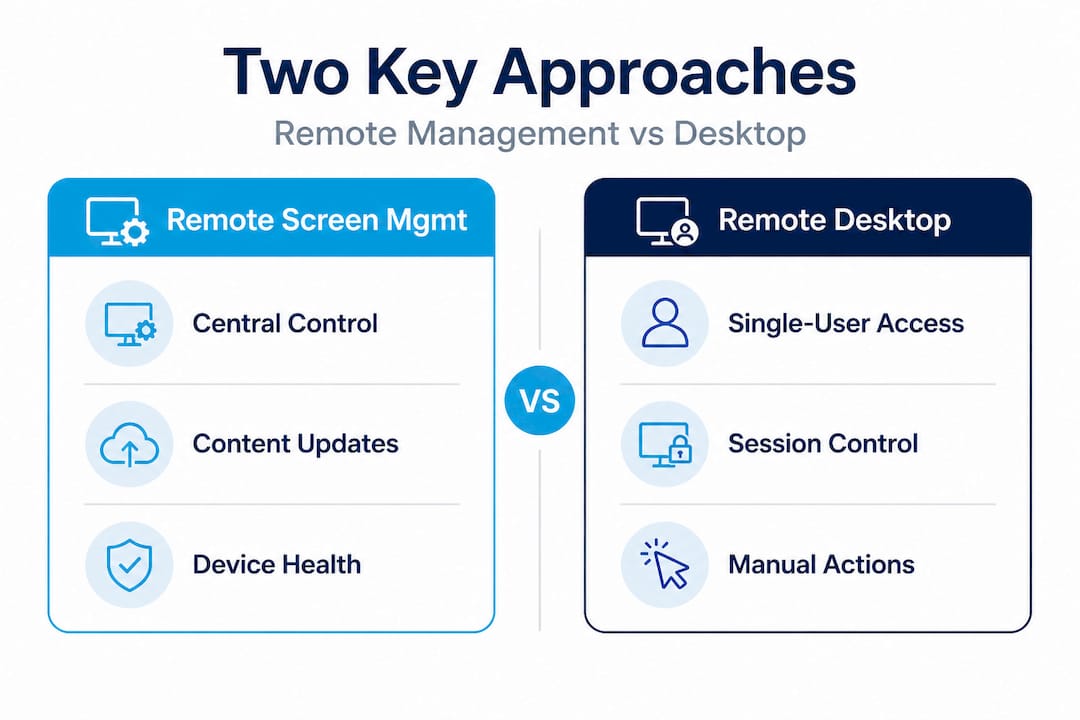
The distinction matters enormously for IT strategy. If you are managing five screens, the difference may feel academic. If you are managing 50, 500, or 5,000 screens across multiple locations, the right tool becomes operationally critical. You need a platform built specifically for display orchestration, not a workaround using general-purpose remote access software.
| Feature | Remote desktop | Remote screen management |
|---|---|---|
| Primary purpose | Access a computer session | Manage display content and devices |
| Content scheduling | Not supported | Built-in scheduling and automation |
| Multi-screen control | One session at a time | Manage hundreds simultaneously |
| Device health monitoring | Limited | Real-time status and alerts |
| User permission levels | Basic | Granular role-based controls |
| Designed for signage | No | Yes |
A solid multi-screen management guide can help you map these capabilities to your specific environment. Understanding this distinction is the foundation of any effective digital signage strategy, especially in hospitality management contexts where guest-facing screens must be accurate and current at all times.
“Treating remote screen management as a subset of IT remote access is one of the most common strategic errors we see. These are separate disciplines with separate tools, and conflating them creates gaps in content reliability, device visibility, and operational control.”
Key functions and capabilities: What remote screen management really offers
Now that you understand what remote screen management is, let’s explore exactly what it empowers you to do.
Screen management for signage is about centralized control of signage content and device health, not desktop session access. That means the platform you choose should deliver a specific set of capabilities that go well beyond simple playback.
Here is what a mature remote screen management platform should offer:
- Content push and scheduling: Push new content to individual screens, groups, or your entire network in real time. Schedule campaigns to go live at specific times without manual intervention.
- Device health monitoring: Track online/offline status, playback errors, storage levels, and hardware performance across every screen from one dashboard.
- Remote troubleshooting: Reboot devices, clear caches, or push software updates without dispatching a technician to the physical location.
- Role-based permissions: Assign different access levels so a store manager can update local promotions while only IT admins can modify global settings or system configurations.
- Proof of play reporting: Verify that scheduled content actually played, which is essential for compliance in regulated industries and for advertising accountability.
- Multi-zone content layouts: Control different content zones on a single screen simultaneously, running a video in one area and live data feeds in another.
- Integration with live data sources: Pull in real-time information like weather, stock prices, social media feeds, or internal KPIs and display them automatically.
Pro Tip: When evaluating platforms, ask for a live demonstration of the device health dashboard. How quickly does it show a screen going offline? How easy is it to isolate one location’s screens versus the entire network? The answer will tell you a lot about the platform’s operational maturity.
These capabilities directly reduce downtime and labor costs. Without remote management, a single screen displaying outdated content requires someone to physically update it. Multiply that across dozens of locations and the inefficiency compounds fast. Organizations that invest in signage optimization consistently report lower operational overhead and faster content deployment cycles.
The growing demand for digital signage across industries is also driving higher expectations for what these platforms can do. IT teams are being asked to manage more screens, in more locations, with less hands-on involvement. Remote screen management is the infrastructure that makes that possible.
Common applications across industries
Having reviewed the fundamental capabilities, it’s useful to see how these functions are leveraged in real-world organizational settings.
Centralized control of content and screens is crucial for IT in industries managing distributed displays. Here are five sectors where remote screen management delivers clear, measurable value:
- Hospitality: Hotels and resorts operate lobby displays, digital wayfinding systems, meeting room signs, pool and spa schedules, and restaurant menus across a single property or an entire chain. Managing these manually is unsustainable. With remote screen management, a central marketing or IT team can update every guest-facing screen instantly, ensuring digital signage enhances the guest experience rather than degrading it with stale content. Solutions from specialists like hospitality business advisors confirm that display reliability is directly tied to guest satisfaction scores.
- Retail: A retail chain with 30 locations needs consistent brand messaging, accurate pricing displays, and timely promotional content across all stores. Remote screen management lets the central team push a new promotion to every location simultaneously, while allowing local managers to overlay store-specific messaging. The ability to manage retail screens this way eliminates both inconsistency and the delay caused by manual updates.
- Corporate offices: Enterprise IT teams use remote screen management to broadcast internal communications, live event streams, safety alerts, and KPI dashboards across office locations. When a CEO announces a company-wide initiative, that message can appear on every screen in every office building within minutes, not days.
- Healthcare: Hospitals and clinics rely on accurate, real-time information for patient safety and operational flow. Waiting room displays, wayfinding screens, and staff communication boards must be updated quickly when situations change. Remote screen management allows administrators to push emergency alerts, update wait times, or modify directional signage in real time, without requiring IT support to be physically present.
- Education: Universities and K-12 institutions use digital displays for schedules, event announcements, emergency notifications, and campus wayfinding. A centralized remote management system means the communications team can update displays across an entire campus or multiple campuses instantly. Exploring examples of display content that work well in educational settings can help institutions plan their content strategy effectively.
A notable data point: organizations that implement centralized digital signage management report content update times dropping from hours to minutes, with error rates reduced by more than 60% compared to manual workflows. That is a significant operational gain for any IT department managing distributed infrastructure.
Choosing the right solution: Features, challenges, and best practices
If you are considering implementing or optimizing remote screen management, the next step is understanding what features and approaches matter most.
Screen management for signage is about orchestration and device health, not just remote desktop features. When you evaluate platforms, focus on these criteria:
| Evaluation criterion | What to look for |
|---|---|
| Security | Multi-factor authentication, encrypted data transfer, role-based access |
| Scalability | Handles growth from 10 to 10,000+ screens without performance degradation |
| Hardware compatibility | Supports Android, Windows, web-based players, and major display brands |
| Content distribution speed | Near real-time updates with minimal latency across regions |
| Monitoring and alerts | Proactive notifications for offline devices or playback errors |
| Reporting | Proof of play, uptime statistics, and engagement data |
| Ease of use | Non-technical staff can create and schedule content without IT involvement |
Common challenges that organizations face during implementation include:
- Network dependency: Remote screen management requires stable internet connectivity at each location. Plan for offline playback fallback so screens continue displaying content even during brief outages.
- Device standardization: Mixed hardware environments create compatibility headaches. Audit your existing displays and media players before selecting a platform. Review signage hardware options to understand what is supported.
- Permission management at scale: As more teams gain access to the platform, governance becomes critical. Define who can update what before rollout, not after.
- Integration with existing systems: Your signage platform should connect to your scheduling software, HR systems, or data sources rather than becoming another isolated tool.
Pro Tip: Start with a pilot deployment at two or three locations before rolling out organization-wide. This lets you test your workflows, identify network weak points, and train your team on the platform before the stakes are high.
Best practices for platform selection include requesting a free trial or sandbox environment, checking for dedicated onboarding support, and reviewing customer case studies from organizations similar in size and industry to yours. Resources like multi-location display management tips provide practical frameworks for scaling deployments responsibly. For hospitality and multi-site organizations, analytics and advising specialists can also add value by benchmarking your deployment against industry norms.
Why most organizations underestimate remote screen management
At this point, you have seen both the basics and strategic details. But let’s shift to a broader view of why organizations repeatedly misunderstand what’s at stake.
Most IT teams treat digital signage as a peripheral concern, something that belongs to marketing, facilities, or communications rather than a core infrastructure responsibility. That mindset is increasingly outdated. As display networks grow in scale and strategic importance, remote screen management becomes mission-critical infrastructure, not a marketing accessory.
The organizations that struggle most are those that started with basic tools and never revisited the decision. A free or low-cost media player app that works fine for three screens becomes a liability at 30. There is no centralized monitoring, no automated scheduling, no way to push an emergency alert network-wide without logging into each device individually. The operational cost of that limitation is rarely calculated upfront and always underestimated.
What we consistently observe is that the ROI of advanced remote screen management is not just in labor savings. It is in content accuracy, brand consistency, and risk reduction. A hospital displaying outdated wayfinding information can affect patient safety. A retail store running the wrong promotional price can create legal and financial exposure. These are not edge cases.
The future of remote screen management is moving toward AI-assisted content scheduling, predictive device maintenance, and real-time audience analytics. Platforms like DST Connect are already building these capabilities into their core offering, which means organizations that invest in modern orchestration platforms now will be positioned to leverage those advances without another platform migration later.
The uncomfortable truth is that treating screens as simple endpoints, something you plug in and forget, is a strategic failure waiting to surface. The organizations that win with digital signage are the ones that treat their display network as managed infrastructure, with the same rigor they apply to servers, networks, and endpoints.
Get started with advanced remote screen management
If this guide has clarified what remote screen management really involves, the next step is putting that knowledge into action. DST Connect provides a complete platform for managing digital signage across any number of locations, with tools designed specifically for IT teams and communications professionals. From cloud-based content scheduling to real-time device monitoring and multi-user access controls, it covers the full scope of what modern display management requires.
You can explore step-by-step setup and configuration guidance through DST Connect IT instructions, designed specifically for IT professionals who need to deploy and manage signage infrastructure efficiently. For teams looking to build deeper expertise, DST Academy offers structured learning resources that take you from setup to advanced automation. Whether you are starting fresh or optimizing an existing deployment, DST Connect gives you the tools and support to manage smarter.
Frequently asked questions
How is remote screen management different from remote desktop?
Remote screen management controls signage devices and published content across a display network, while remote desktop provides access to individual computer sessions. They serve fundamentally different IT functions and should not be used interchangeably.
What types of content can be pushed remotely to screens?
You can remotely update digital signage assets including videos, images, graphics, slideshows, live data feeds, schedules, announcements, and emergency alerts. Most platforms support a wide range of media formats and dynamic content sources.
Is remote screen management secure for large organizations?
Yes, provided the platform includes multi-factor authentication, encrypted communications, role-based user permissions, and proactive device monitoring. Security features should be a primary criterion when evaluating any platform for enterprise deployment.
Do I need special hardware for remote screen management?
Most platforms support a range of commercial displays and media players running Android, Windows, or browser-based players. You should verify compatibility with your existing hardware inventory before committing to a platform.
Can I automate content schedules for multiple locations?
Yes, remote screen management platforms allow you to build automated schedules that sync content across all sites simultaneously from a central dashboard, including dayparting, event-triggered content, and location-specific overrides.
Recommended
- Multi-screen management: a complete guide for digital signage
- Multi-location display management tips for success
- How to manage retail screens for engaging digital signage
- Master digital display scheduling: a practical guide
- Remote Team Management – Essential Tips – Attorney Assistant | Attorney Assistant
- VPS for remote work: A performance guide for IT leaders
Enjoyed this blog?
Continue with the previous or next article and discover more ideas, insights and inspiration from DST Connect.