
Top interactive menu board examples to boost engagement
Choosing the right interactive menu board is harder than it looks. Customers expect fast, personalized, and visually compelling experiences, and a static board simply cannot deliver that anymore. The wrong choice wastes budget and frustrates customers. The right one drives measurable sales growth, speeds up service, and builds loyalty. This article walks you through the key evaluation criteria, real-world examples from retail, hospitality, healthcare, and education, and a clear framework to help you match the best solution to your sector.
Table of Contents
- What makes an interactive menu board effective?
- Retail and quick-serve: Real-world menu board transformations
- Innovative uses in healthcare and education
- Critical challenges and expert tips for success
- Which interactive menu board is right for you?
- Transform your customer experience with DST Connect
- Frequently asked questions
Key Takeaways
| Point | Details |
|---|---|
| Boosts engagement and sales | Interactive menu boards consistently increase customer participation and drive higher sales. |
| Sector-specific solutions | Choose features based on your sector’s needs—what works for retail may not suit healthcare or education. |
| Efficiency and satisfaction gains | Boards with real-time updates and order integration improve both user experience and operational efficiency. |
| Watch out for pitfalls | Success depends on smart deployment—avoid over-investing in features and always focus on accessibility. |
What makes an interactive menu board effective?
Not every screen qualifies as truly interactive. The difference between a digital display and a high-performing interactive menu board comes down to a specific set of features and how well they serve your customers in context.
Interactivity boosts ROI by reducing perceived wait times, increasing average order value through upsell prompts, and personalizing the experience based on time of day or customer input. Touchscreen browsing, dietary filters, and real-time updates are essential features that separate effective boards from expensive wallpaper. Multi-language support and accessibility compliance (such as ADA-compatible interfaces) are equally critical, especially in healthcare and education settings.
Here are the must-have features to evaluate:
- Touchscreen interaction for self-service and order customization
- Real-time content sync connected to your POS or inventory system
- Dietary and allergen filters for customer safety and satisfaction
- Multi-language support to serve diverse audiences
- Accessibility compliance including screen reader support and high-contrast modes
- Cloud-based management for remote updates across multiple locations
Understanding dynamic menu board trends can help you prioritize which features matter most for your specific context. And if you want a broader view of what interactive technology can do, the interactive signage guide covers the full landscape.
Pro Tip: Strategic placement consistently outperforms over-complicated feature sets. A well-positioned board at the decision point, such as the entrance or the ordering counter, will outperform a feature-heavy board placed in the wrong spot.
Retail and quick-serve: Real-world menu board transformations
With clear criteria in mind, let’s look at how retail and quick-service leaders put these features into practice, delivering measurable gains.
Starbucks deployed a three-panel LED menu board system that synchronized promotions across locations in real time. The result was a 22% campaign uplift in targeted locations, driven by consistent messaging and dynamic content scheduling. Farmer Boys, a regional quick-service chain, used interactive boards to push real-time menu updates tied to ingredient availability, achieving a 20% increase in sales for featured items. Firehouse Subs focused on order efficiency, using boards to streamline the customization process and reduce average transaction time.
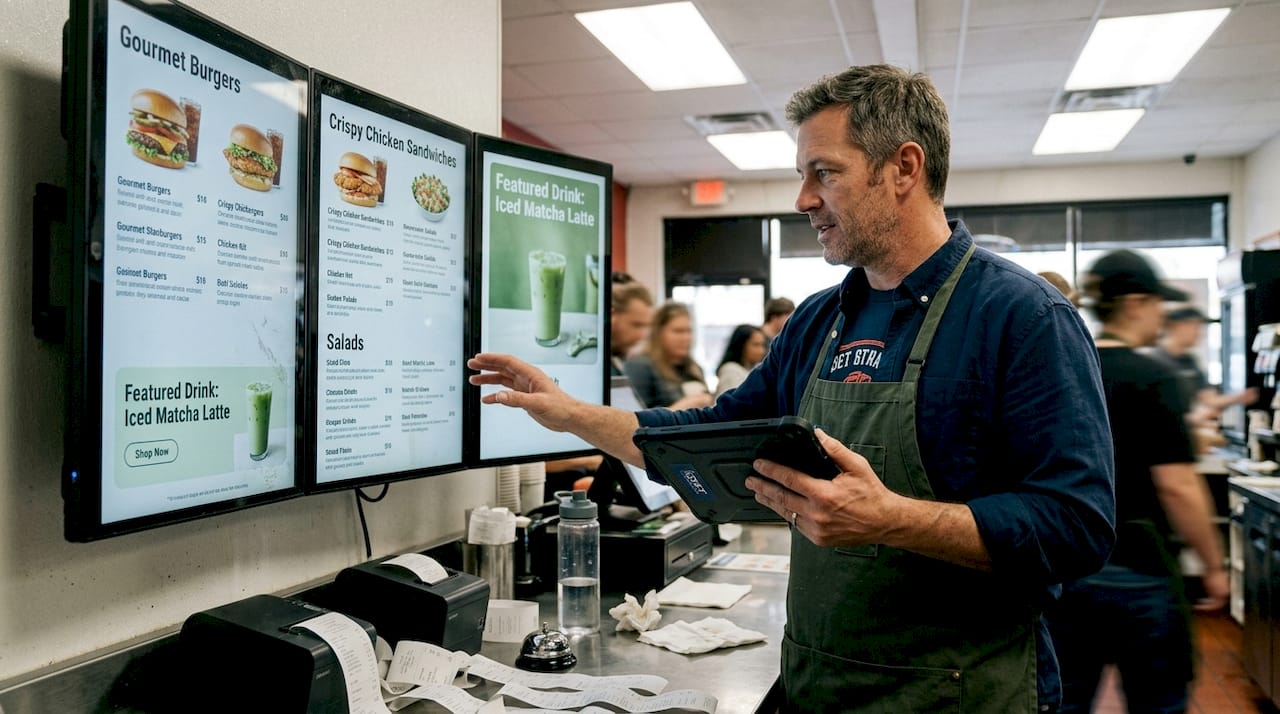
These aren’t isolated wins. Across the quick-service sector, brands that adopt interactive boards report up to 99% menu consistency across locations, eliminating the costly errors that come with manual updates.
Here is a quick comparison of how these brands applied interactive boards:
| Brand | Feature used | Measured result |
|---|---|---|
| Starbucks | 3-panel LED with real-time sync | 22% campaign uplift |
| Farmer Boys | Real-time menu updates | 20% sales increase |
| Firehouse Subs | Order customization flow | Faster transaction times |
For more sector-specific inspiration, explore hospitality display examples and review the data behind digital signage demand to understand why adoption is accelerating.
Innovative uses in healthcare and education
Beyond retail and hospitality, interactive menu boards solve different but equally important challenges in healthcare and education.
In healthcare, the stakes are high. Baptist Health Care implemented interactive wayfinding and menu boards across its facilities, and the results were significant. Piedmont Regional Medical Center reported 22% higher patient satisfaction and a 72% improvement in navigation accuracy after deploying interactive boards in key areas. Patients found it easier to locate departments, understand dietary options in cafeterias, and access health information at their own pace.
In education, leading schools and universities use interactive boards in cafeterias, libraries, and common areas to display daily menus, event schedules, and emergency alerts. The benefits extend beyond convenience.
Here are the key benefits observed across both sectors:
- Improved satisfaction scores from patients and students who feel better informed
- Faster navigation through complex facilities, reducing staff interruptions
- ROI achieved in under a year through reduced printing costs and staff time savings
- Real-time updates that keep information accurate without manual intervention
- Accessibility features that serve patients and students with diverse needs
| Sector | Primary use case | Key outcome |
|---|---|---|
| Healthcare | Wayfinding and dietary menus | 22% satisfaction increase |
| Education | Cafeteria menus and event info | Reduced print costs, faster updates |
“Interactive boards in healthcare settings don’t just display information, they actively reduce anxiety, improve navigation, and free up staff to focus on care rather than answering directional questions.”
For organizations focused on enhanced guest experience, these results demonstrate that interactive boards are a strategic investment, not just a visual upgrade.
Critical challenges and expert tips for success
While the success stories are impressive, making interactive menu boards work for your sector requires navigating a few challenges with smart strategies.
The most common pitfalls include:
- Hardware over-investment in features your audience won’t use, inflating costs without improving outcomes
- Poor user experience design that confuses customers instead of guiding them
- Excessive animation that distracts rather than informs, especially in high-stress environments like hospitals
- Weak POS integration that causes menu inconsistencies and erodes customer trust
- Neglecting accessibility which can exclude a significant portion of your audience and create compliance risks
Hardware costs and feature overkill can reduce ROI when not managed strategically. The solution is to start with a clear use case and build from there, rather than buying the most advanced system and hoping it fits.
“The optimal screen placement is at eye level, within 10 feet of the decision point. Anything further reduces engagement by up to 40%.”
Pro Tip: Before committing to a full rollout, test one or two boards in your highest-traffic location. Measure dwell time, order accuracy, and customer feedback before scaling. This approach saves budget and surfaces UX issues early.
For technical guidance, review AV display tips to optimize your hardware setup, and explore signage automation advice to reduce manual content management overhead.
Which interactive menu board is right for you?
To wrap up, let’s match the right type of interactive menu board to your sector and lay out clear steps for smarter implementation.
Sector context drives board style and feature selection for maximum ROI. A hospital needs accessibility and wayfinding. A quick-service restaurant needs speed and POS integration. A school cafeteria needs simplicity and real-time updates. Matching the solution to the context is the single most important decision you will make.
Here is a sector-by-sector matching framework:
| Sector | Must-have features | Best-fit solution |
|---|---|---|
| Retail | Real-time promotions, POS sync | Multi-panel LED with CMS |
| Hospitality | Order customization, speed | Touchscreen kiosk with POS integration |
| Healthcare | Wayfinding, accessibility, ADA compliance | Interactive wayfinding boards |
| Education | Simple updates, event scheduling | Cloud-managed display with scheduling |
Once you have identified your sector fit, follow these steps to move forward:
- Define your primary use case before evaluating any hardware or software
- Set a realistic budget that includes installation, content creation, and ongoing management
- Pilot in one location and measure engagement, satisfaction, and operational impact
- Evaluate CMS flexibility to ensure you can update content without technical support
- Plan for accessibility from day one, not as an afterthought
- Scale based on data, not assumptions
For practical starting points, display template guidance can help you visualize what your boards could look like before you commit to a platform.
Transform your customer experience with DST Connect
If you’re ready to move from planning to action, DST Connect offers a complete solution for organizations across retail, hospitality, healthcare, and education. The platform gives you access to over 700 professionally designed templates, a drag-and-drop editor that requires no design skills, and a cloud-based dashboard to manage screens across multiple locations from anywhere in the world. The digital signage software integrates with your existing systems and supports Android, Windows, and URL-based media players, making it flexible enough to fit your current setup. Pair it with the right hardware for digital signage and you have a scalable, cost-effective solution that grows with your organization. Book a demo today and see how DST Connect can help you deliver the kind of interactive experience your customers expect.
Frequently asked questions
What are the main benefits of interactive menu boards?
Interactive menu boards increase sales efficiency and engagement by enabling real-time updates, personalized ordering, and faster service, all of which directly improve the customer experience.
How do interactive menu boards impact customer satisfaction in healthcare?
Patient satisfaction rose 22% in facilities that deployed interactive boards, primarily because wayfinding improved and patients could access information independently.
What technical challenges should I prepare for?
Hardware costs and feature overkill are the most common issues. Prioritize accessibility, ensure POS integration is tested before launch, and avoid overbuilding your initial setup.
Do interactive menu boards work outdoors?
Yes. Weatherproof displays and correct screen sizing are the two most critical factors for outdoor success, along with brightness settings calibrated for direct sunlight conditions.
Recommended
Enjoyed this blog?
Continue with the previous or next article and discover more ideas, insights and inspiration from DST Connect.